Easily send large number of personalized e-mails to your clients using data from your existing databases to help your marketing efforts.

Supports MS Access, SQL Server, Oracle, etc.

Dynamically generated messages

Ability to send HTML messages

Ability to include attachments

Several sending modes

Various E-Mail and SMTP options

Ability to exclude certain e-mail addresses

Click to enlarge!
Order Now!
Order Now!
Download Now!

How It Works

The product works in the following way:

  1. First, using the tools provided by the product, you select specific records that contain certain information about your clients (like name, e-mail address, etc.) from your existing database that you want to use to compose your personalized e-mails
  2. then you simply write up the message you want to send using special placeholders in place of names and other dynamic data
  3. finally the program will generate personalized e-mails replacing the placeholders in your message template with real data, and it will then send the generated e-mail messages using e-mail account and settings of your choice

Overview of Benefits

Supports Microsoft Access, SQL Server, Oracle, and other databases

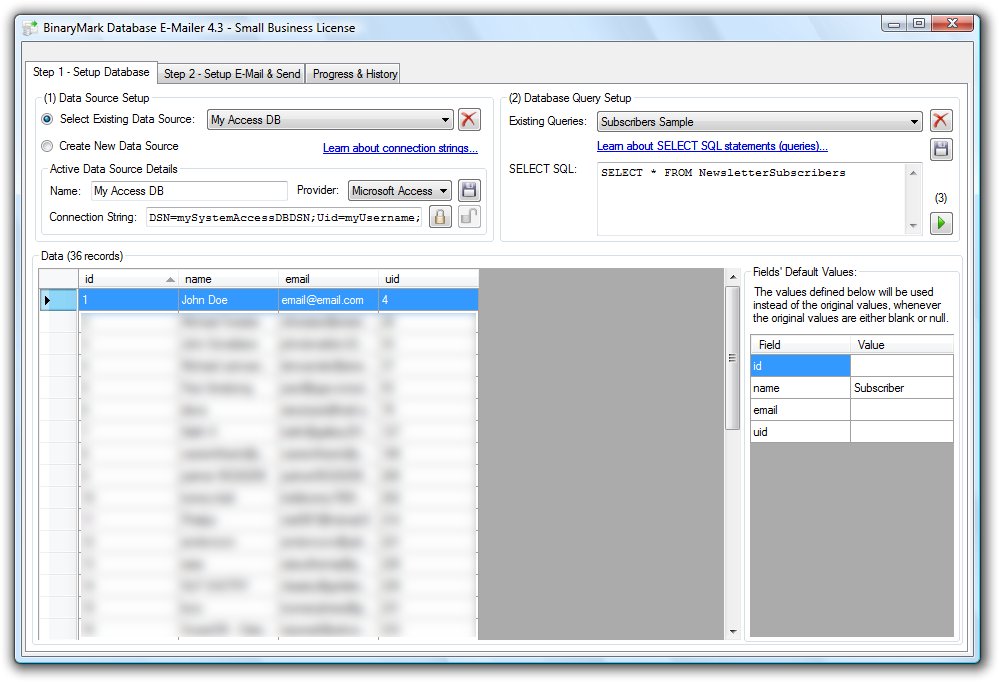
The product lets you retrieve desired data from a variety of sources. In fact it supports any ODBC-compliant data source, such as Microsoft Access database, SQL Server or Oracle databases, or any other. If in doubt as to whether you can import your data into the program, feel free to contact us. The data is imported into the program using two simple steps.

First, you setup the data source (define the file path to the database, if it’s file-based, provide needed login information, etc.) by composing what’s called a connection string (you can learn more about connection strings here). You can then save that information in an encrypted format for future use by the program.

Secondly, you simply write SQL SELECT statement that will retrieve the desired records from your database. It could be as simple as SELECT * FROM Customers, or much more complex – you can use whatever your data source supports. If you do not know how to write SQL statements, do not worry, they are easy to learn and will benefit you greatly. You can learn more about them here.

Generates personalized messages dynamically

As was already mentioned the program uses placeholders that you insert in your e-mail message template to personalize e-mails it generates. Basically, once it has retrieved the data from your database, it will generate an e-mail for every record (row in a table), using your e-mail template, where it will replace all placeholders it finds with the data from that data record. So, for example, if in your template you include text "Dear %firstname%", where %firstname% is a placeholder, the program will replace it with the data taken from the column with the same name (in this case the column named "firstname"); and thus if the current record has "Michael" as the value for this column, the generated text will be "Dear Michael".

Ability to send HTML messages

You can send both text-only and HTML-based messages with this program. Additionally you can specify message and subject encodings such as UTF or ASCII, etc., as well as e-mail priority. What’s more is that you can also specify different values for to, CC, and BCC fields!

Work with attachments

The program also lets you to send attachments with your messages. This way you can send even more information to your prospective clients.

Supports several sending modes

The program supports two different sending modes: one that will send messages continually – as soon as the program had finished sending one message it will start sending the next one; and mode that will send messages every specified amount of time – like sending e-mail message every 5 seconds. The latter option is handy if your SMTP e-mail server has restrictions on the number of e-mails you can send within a given time interval.

Various e-mail and SMTP options

You can use as many e-mail accounts as you want in this product. All e-mail accounts that you register with the program can be saved in an encrypted form for better security. For each e-mail account you can specify regular setting like server address, login, and password, as well as some additional ones: outgoing port, SSL support, reply-to e-mail address, and some others. Please note, that currently only SMTP e-mail accounts are supported.

Ability to exclude certain e-mail addresses

The product also lets you to exclude certain e-mail addresses, so that e-mails will never be sent to them, even if they are present in the records retrieved by the program from your database. In fact you can specify permanently blocked e-mail addresses, as well as temporary. What’s more is that there is an option to prevent sending duplicate e-mails. This is useful if the same e-mail address appears more than once in the records retrieved by the program from your database.

Order Now

Features

Review detailed list of program features:

  • Import data from ODBC-compliant data sources
  • Save data sources, so you won't need to re-enter connection information again
  • Use SELECT SQL statements to retrieve data from databases
  • Save SELECT SQL statements for future use
  • Manually remove retrieved records from the program
  • Define default values for placeholders, in case record would be empty or NULL
  • Support for SMTP e-mail accounts
  • Support for message templates
  • Support for attachments
  • Support for various message encodings
  • Preview e-mail messages before they are sent
  • Send e-mails continually or every specified amount of time
  • Avoid duplicate e-mail being sent
  • History of e-mail campaigns
  • Much more!

Order Now

New in Version 4.3

  • Ability to save e-mail accounts added
  • Ability to delete records added
  • Option to set e-mail message importance added
  • User Interface tweaked

Screenshots

Minimum Requirements

  • Windows Vista/XP/Me/98/2008/2003/2000
  • 800 x 600, 16-bit Screen resolution
  • 800 MHz Processor
  • 128 MB of RAM