

Streaming Video Downloader
Your smarter way to save videos and record live streams from the Internet!
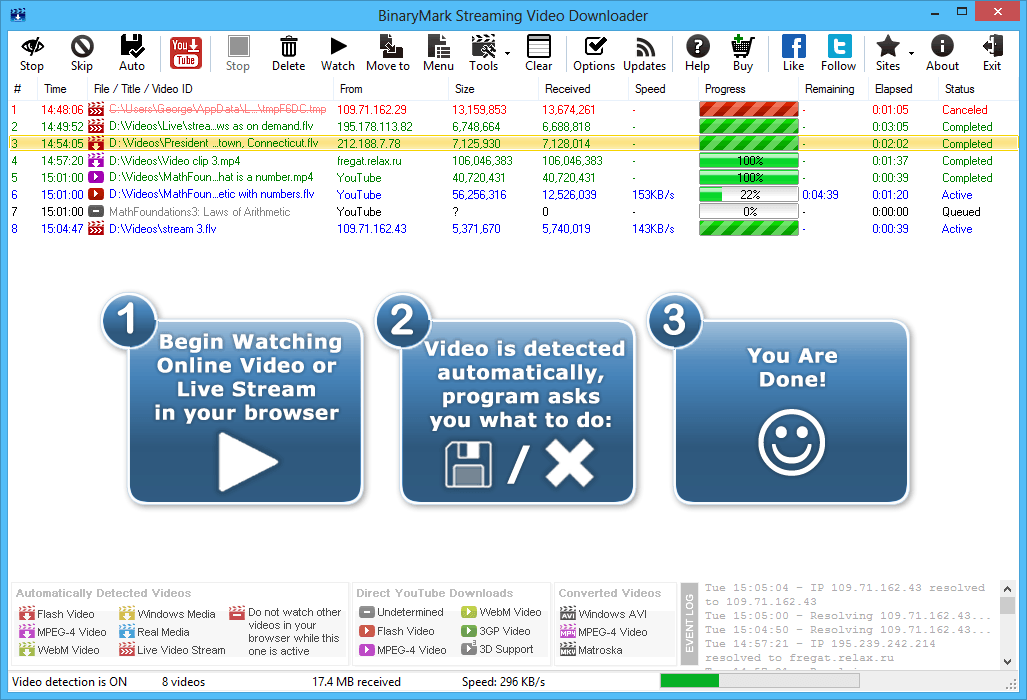
Works with 99% of websites and streaming platforms like YouTube, DailyMotion, Vimeo…
Built-in YouTube Downloader saves multiple videos & entire playlists in desired format & quality
Works with all video types: Flash FLV, Silverlight, Real Media, QuickTime, HTML5!
Does not install or require any drivers, services, browser extensions or plugins!
Automatically save videos & record live streams as you watch them in your favorite web browser:
Top Features
Streaming Video Downloader is a small, light-weight computer program that lets you save Adobe Flash FLV, Silverlight, WebM, QuickTime, RealMedia videos, and various Live Video Streams from Internet websites like YouTube, Fora.TV, EarthCam, and many others! It works with all modern browsers!
3000+
happy users
1000000+
videos downloaded
1000000+
hours of video preserved
1000+ TB
of bandwidth saved
How Streaming Video Downloader Works
Start Watching the Video You Want to Save
Once Streaming Video Downloader is running, head to your web browser and start watching a video you wish to save. It is important that you start from the beginning. Preferably, refresh the web page if it was open before Streaming Video Downloader was launched.
Streaming Video Downloader Automatically Detects and Saves the Video!
At this point, the program should automatically detect the video and display the Save Video dialog like the one shown below:
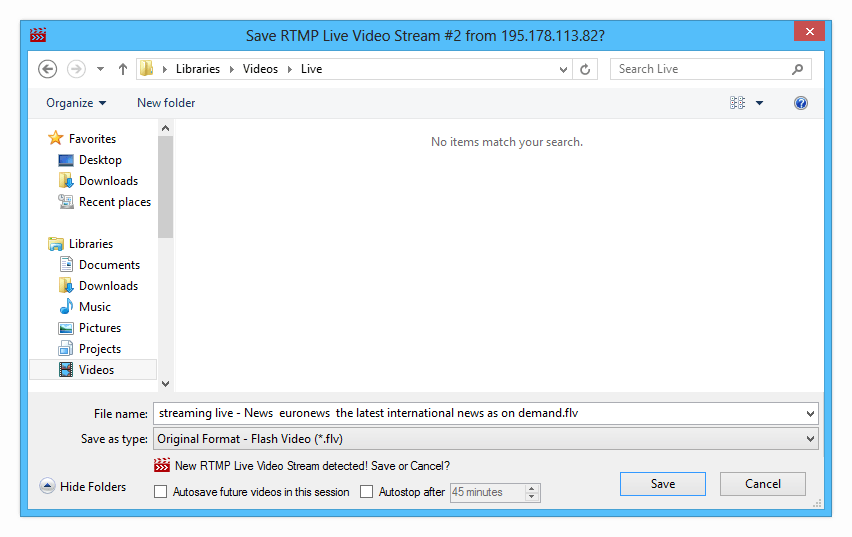
Save Video Dialog is displayed whenever the program detects a new video being watched in your web browser.
If you want to keep the video, select the folder and a file name and click Save. If you do not want to save the video, click Cancel and the program will stop recording it.
Save Video Dialog highlights:
- Automatically suggested intelligent file name based on the title of a video you are watching
- Information about the type of a video is clearly displayed
- Option to automatically save all future videos in the program session is always present
- If the video being saved is actually a live stream being broadcasted, it also displays an option to automatically stop capturing it after a set amount of time
Keep Browser Tab or Window with Video Open
As long as you want the video to be saved (captured) by Streaming Video Downloader, you should keep the browser tab or window with the video open. You can however mute the volume, or switch to a different tab, window, or program. Simply do not close the window that has the video being played! Also, it is recommended NOT to pause video playback either as this may interfere with download.
Streaming Video Downloader operates by scanning Internet traffic for incoming video content. When it sees that there is an incoming video content, it will prompt you to save that video. You can save videos in various formats: FLV, AVI, MP4, MKV for Flash videos; WMV for Silverlight Videos; MOV for QuickTime videos; RM for RealMedia videos; WEBM for WebM videos. It is also possible to convert video from one format to another once it was saved.
You Are Done! That's It! The Video is Saved!
Whenever you begin watching a video in your browser, the program will automatically start saving it in the background, at the same time asking you if you want to keep the video. If you do want to keep the video, you can simply enter a file name and click Save. If you don't want to keep the video, you can click Cancel, and the already saved part will be deleted.
So, saving videos is super-easy: simply start watching one, and click Save - no need to find and paste URLs - everything is done automatically! And you can save videos in various formats: FLV, AVI, MP4 for Flash videos; WMV for Silverlight videos; WEBM for WebM videos; MOV for QuickTime videos; and RM for RealMedia videos.
Save Videos Automatically, without Prompt
Version 5 added automatic saving mode, where no prompt to save the video is shown, and the video is saved automatically to a specified folder with specified file name. In this mode, you won't even notice the program is actually running and saving the videos in the background automatically while you are watching them in your browser!
You can activate autosave mode either for one session or permanently until turned off. It can be further configured in program options.
User Guide
Learn more about program operation and options in the Online User Guide.
Save Only the Videos You Need & Skip Others
Streaming Video Downloader is intelligent enough not to ask you about saving every single video! Some videos may be ads, others may be too short or too small. For these cases, there are predefined video filters that you can customize, preventing the program from saving unwanted videos.
In addition, Streaming Video Downloader can detect duplicate video downloads, and will not ask you to save videos that have already been detected previously. This option can be turned off any time.
You can also always temporarily prevent Streaming Video Downloader from detecting new videos, while letting it continue download already active videos. This can be accomplished by toggling Skip Mode by either a hot key or a toolbar button.
Not only can Streaming Video Downloader save all kinds of videos from the web, but it will save only the ones you actually want!
Watch Streaming Video Downloader in Action
Video presentation below features an older version of the product, but all the shown features as well as operating mode apply to the newer version as well.

Why Streaming Video Downloader?
Streaming Video Downloader is better than other downloaders!
While there are many video downloaders on the Internet these days - both free and paid - only Streaming Video Downloader offers the ease of use and convenience - packed with features that you are looking for!
Streaming Video Downloader
Convenient
It runs in the background and saves videos while you watch them, not wasting your bandwidth or time!Respects Your Privacy
Does not connect to websites on its own (except YouTube downloader) and only has access to whatever your browser providesHigh Video Quality
Because it merely saves video data that the browser receives, it will always produce high quality videos.Guaranteed to Work
As long as it can detect a video in your web browser, it will be able to save it regardless if it came from regular or password protected website.Fast and Lightweight
It is really lightweight on system resources and downloads videos with exactly the same speed as your browser!
Other Downloaders
Inconvenient
Require manual activation and copy-pasting download linksPotential Privacy Issues
Other downloaders connect to websites on your behalf and may leak sensitive informationUnreliable Video Quality
Video quality may not be the same as the one you get when playing it in your web browserDownloads May Fail
If a video is located on a password-protected website, other downloaders may fail to save it.Speed can be Slow
Because other downloaders waste bandwidth and download videos manually (in addition to what was downloaded already by your browser), speed may be a lot slower and results not as reliable. In addition you are generating more unnecessary traffic.
Streaming Video Downloader is better than screen capture!
Videos from the Internet can of course be saved in other ways. For example, you can use screen capture and screencasting programs to record video as it is being played on the screen, at the same time capturing audio output from your speakers.
Streaming Video Downloader
Convenient
You can access other windows and tabs, browse the WebM and use other programs while the video is being saved in the background!Small File Size
Resulting file size will exactly equal the number of bytes that were received; there will be no overhead!High Video Quality
Resulting video quality will be on top - exactly the same as it was played in the browser!No Noise
Only relevant video content is saved! You do not have to worry about moving your mouse over a video and other little nuances you have to keep in mind if doing a screen capture.Lightweight
Your CPU is free to do other stuff, as Streaming Video Downloader typically uses no more than 1% to 2% of CPU while its running!Ease of Use
Saving a video from the Internet with Streaming Video Downloader couldn't be simpler - simply start watching one ion your browser and the program takes care of the rest!
Screen Capture
Inconvenient
Window or tab with the video has to be on top, and you cannot visit other web pages or use other programs while the recording takes placeLarge File Size
Resulting file size will probably be much bigger than the actual data you received from the web, as all the video and audio content is being re-encodedLow Video Quality
Resulting video quality may be lower, because video content is re-encodedExtra Noise
You may accidentally record mouse movements, content outside video frame, system sounds, and other unwanted dataResource-Hungry
CPU and other system resources are being heavily used because screen video recording process can be quite taxing on system resourcesComplex Setup
The whole procedure is more complicated as you have to start recording manually and synchronously with video playback and take care of a lot of things during the recording
Streaming Video Downloader is better than direct downloads!
Another method to save videos from the web is to whenever possible download them directly. This is a preferred method if a website featuring a video you wish to save provides an easy way to do it or you know the working URL to a video file.
Most often, however, websites do not provide a way to save videos they feature. And rarely will you actually have a working URL to a video file for a number of reasons: URLs may change from time to time, URL may point only to the first video fragment and not the whole video, you may need to have special permission to access a given URL.
Streaming Video Downloader works differently! It does not require you to know or copy a video URL. It simply sits in the background waiting for when you start playing a video in your web browser, and when it detects it, it automatically alerts you and asks if the video should be saved! It cannot be simpler!
Why Bother Saving Videos from the Internet?
It is always a good idea to save web content that you like on your computer, as it may not be available in the future. This includes web videos. Below are some of the reasons why you may consider saving videos on your computer:
- You can access saved videos later at any time, even if you are not connected to the Internet
- The video might be removed from the web in the future
- You may want to put a video on your mobile phone or a media player
- The video might be edited, with the content you liked taken out or changed
- You may want to use video content in your own presentations or videos
- You may want to convert the video to another format
- Many other reasons!
So, it's always a good idea to save videos that you like or which are important to you on your hard disk, flash, or other media, so you can always access it later no matter what might happen to the original publication. Streaming Video Downloader is the only tool you'll ever need to save videos!
Save Videos from YouTube with YouTube Downloader
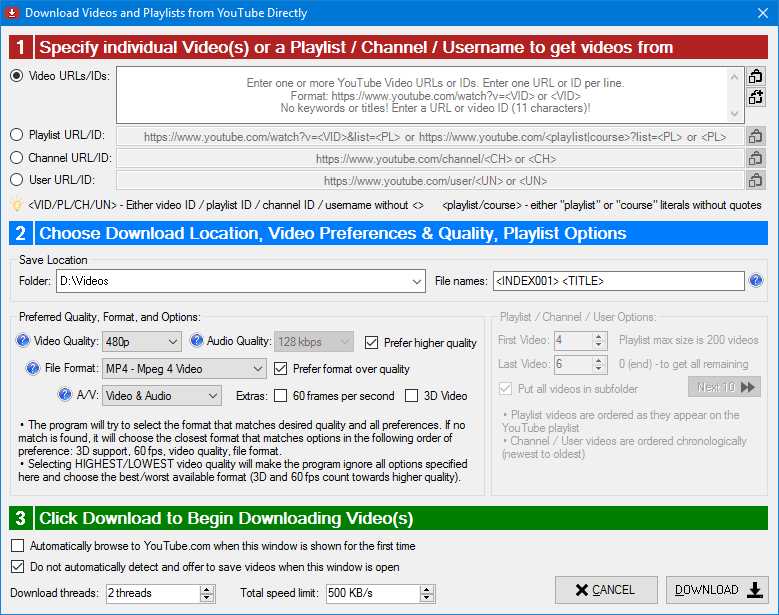
In addition to saving videos simply by having them played out in your web browser; you can save YouTube videos with integrated YouTube Video Downloader!
Downloading YouTube videos directly with integrated downloader, as opposed to capturing them from your web browser has several advantages:
- You can save multiple videos in one batch
- You can download entire playlists, courses, and even whole channels (all user's videos)
- You can specify the quality and format you prefer
- Videos with 3D content can be saved
- Videos in special 60 frames per second format can be saved
- Save videos in ultrahigh resolutions (UHD): 1440p, 2160p, 3072p!
- Videos are saved using friendly file names based on titles retrieved from YouTube
- Choose whether to download video with audio, video-only, or audio-only
- Downloads can be automatically resumed in case of timeouts
What's new in Streaming Video Downloader 7
Here you will find how Streaming Video Downloader improved over time.
This is the biggest update we have done! Virtually whole product got overwritten for the better. Checkout improvements below, and be sure to download FREE version to try it out yourself!
- Added support for saving Mpeg Transport Streams as .ts video files
- Added support for F4M Adobe HTTP Dynamic Streaming
- Added support for detecting and saving OGG Videos and 3GP Videos
- YouTube Video Downloader can now save entire channels (not just playlists)
- Support for UHD videos in YouTube: 1440p, 2160p, and higher!
- Precise selection of format, resolution and other characteristics in YouTube Downloader
- Ability to download video-only, audio-only, or audio+video files from YouTube
- Improved save video dialog that clearly shows video type and several options
- New browser cache monitoring mode allows you to detect even more videos!
- Improved User Interface
- Numerous additional options
- Improved performance and video detection rates
- Windows 10 Support (previous versions may not work properly in Windows 10)
- Added support for saving live video streams and broadcasts
- Added support for Adobe RTMP flash streaming video
- Added support for Adobe HTTP Dynamic Streaming video (f4f and f4p video files)
- Added YouTube Video Downloader that allows you to save multiple YouTube videos in one batch and download entire playlists - all with friendly names and in the video format of your choice
- Support for 3D YouTube videos (mp4 and webm formats)
- Improved save video dialog that clearly shows video type and several options
- Automatically suggested video titles based on active browser tab or window: instead of "Video #3" an actual meaningful video title is suggested as the file name
- Improved autosave. You can now toggle auto save functionality from the toolbar or by pressing hotkey combination. When enabled, you will not see video prompts, and all videos will be saved automatically to the folder of your choice.
- Improved video conversion. It is now possible to automatically convert Flash flv videos to either AVI, MP4, or Matroska MKV video file formats when the download finishes.
- Improved User Interface
- Numerous additional options
- Improved performance and video detection rates
- Windows 8 and Windows 8.1 support
- Added support for saving WebM videos as WEBMs
- Added ability to automatically save all videos to a specified folder without displaying prompt
- Various performance optimizations
- UI tweaks
- More options
- Added support for saving Silverlight videos as WMVs
- Added support for saving Apple QuickTime videos as MOVs
- Added support for saving RealMedia videos as RMs/RAMs
- Added support for video filtering based on file size
- Added German as one of User Interface languages
- Product renamed to Streaming Video Downloader (formerly FLV Video Downloader)
- Various performance optimizations
- UI tweaks
- New options
- Added support for saving High Quality (HQ) videos from YouTube and other sites as MPEG-4 videos (mp4 files)
- Added ability to filter-out unwanted flv videos based on their length and size, so they are not saved
- Numerous performance improvements
- Several UI tweaks
- More options
- Performance improved
- Minor UI tweaks
Info for Geeks
Feel free to skip this section unless you need to see all program options or feel like reading some technical notes.
Customize Streaming Video Downloader to suit your needs
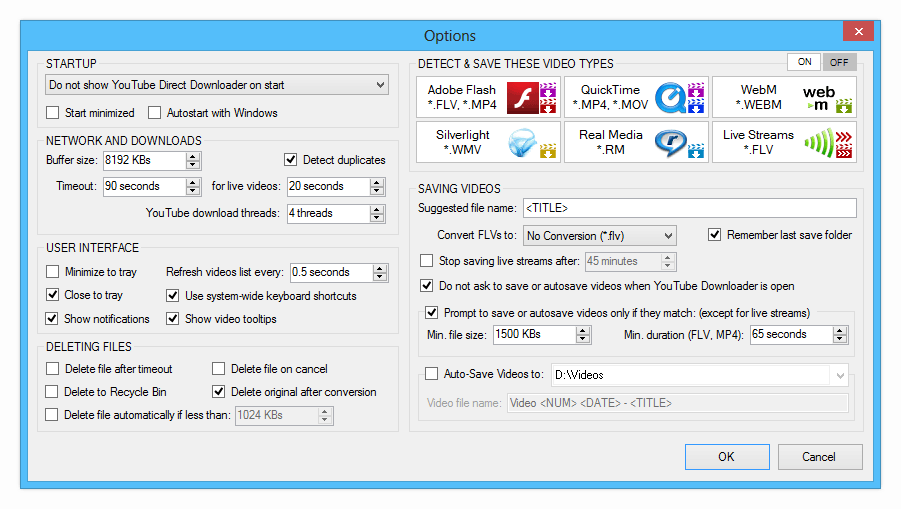
Be sure to check out program options to customize various aspects of program's functionality. In particular:
- Verify the program is using proper Internet connection
- Check the timeout settings
- Configure User Interface elements
- Specify which videos should be saved
- Set preferences for saving videos, such as default suggested name, autosave location, preferred format, and others.
NoteCertain options apply to live videos only.
TipYou can learn more about these options in the User Guide.
Technical Notes
Protocol SupportThe product does not currently support RTP and UDP protocols, and videos streamed in these protocols will not be detected or saved. In addition, RTMPS, RTMPE, and RTMPT variants of RTMP protocol are not currently supported. Support for these protocols is planned for future versions.
Video ConversionVideo conversion is available for FLV video format only. While in most cases converted videos can be played on modern portable devices, there is no 100% guarantee that converted videos will be playable on such portable devices, as different devices have varying support for video and audio codecs.
CompatibilityProduct is not guaranteed to work correctly if any file sharing applications, other downloaders, or network/bandwidth monitoring tools are running at the same time; or if the product is running in a virtual environment (under a VM).
TimeoutsOccasional timeouts may occur for a number of reasons: the connection to a website from which video is being saved is slow or unreliable; the CPU usage is consistently high; network monitoring tools are running; etc.
HTTPsThe program will not be able to detect or save video streams automatically if the website uses https. Only http protocol is supported for on-the-fly download operation.
Are there any shortcuts in the program?
The following shortcuts and hot keys are available:
In the main window:
- Double-Click on the completed download to open the corresponding video file in your default media player to watch it.
- Alt+F4 - immediately stop all downloads and exit the program.
System Tray Icon:
- Double-Click on the system tray icon to show/hide the main window.
System-wide (you do not have to be in the program’s interface for these shortcuts to work):
- Ctrl+F1 - show YouTube Downloader.
- Ctrl+F5 - skip all videos the program detects. All videos the program will come across will be skipped, and you will not get prompts to save them. Normally you would press this combination before you are about to begin watching a video or videos you know you wouldn’t want to save. This has no effect on the already active downloads.
- Ctrl+F10 - stop monitoring your default Internet connection, so that the program will never ask you to save videos.
What is Flash Video?
Flash Video is still a very popular video format on the Internet, although its popularity is now declining due to increasing prevalence of HTML5-based video players. In the recent past popular websites like YouTube, Google Video, and many others were using it as their default video format! Basically, Flash Video is one of the main formats used by the still wide-spread Adove Flash Player.
What is WebM Video?
WebM is an emerging video format designed to provide royalty free high quality video compression in an open format for use with HTML5 video on the Internet. The project's development is sponsored by Google. A WebM file consists of VP8 video and Vorbis audio streams, in a container based on a profile of Matroska. The project releases WebM related software under a BSD License and all users are granted a worldwide, non-exclusive, no-charge, royalty-free patent license.
Legal Disclaimer
End users are warned not to use Streaming Video Downloader in any way that breaks any applicable laws. This includes but is not limited to: accessing online materials in a manner that contradicts the owning website's terms and conditions; infringing on copyright; or using the product in a way that violates online resource's acceptable use policies.
Neither BinaryMark nor its partners (resellers, affiliates, etc.) can be held liable for any illicit actions of the end users (and consequences thereof), that were carried out with, or facilitated by their use of Streaming Video Downloader. The sole responsibility for any and all such actions lies entirely with the end user who carries them out.
Awards & Reviews