

See what's new in Biorhythms Calculator 2026 in this screenshot tour.
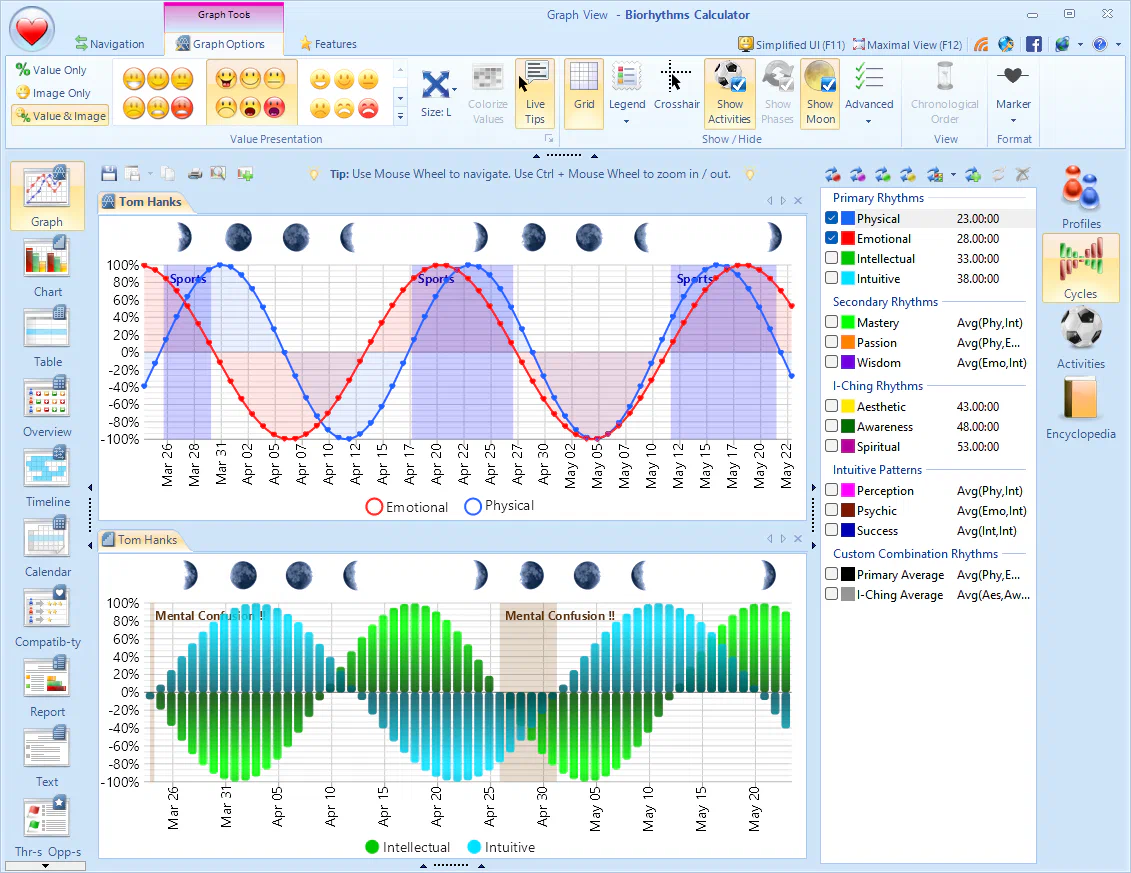
All-New Charting Engine


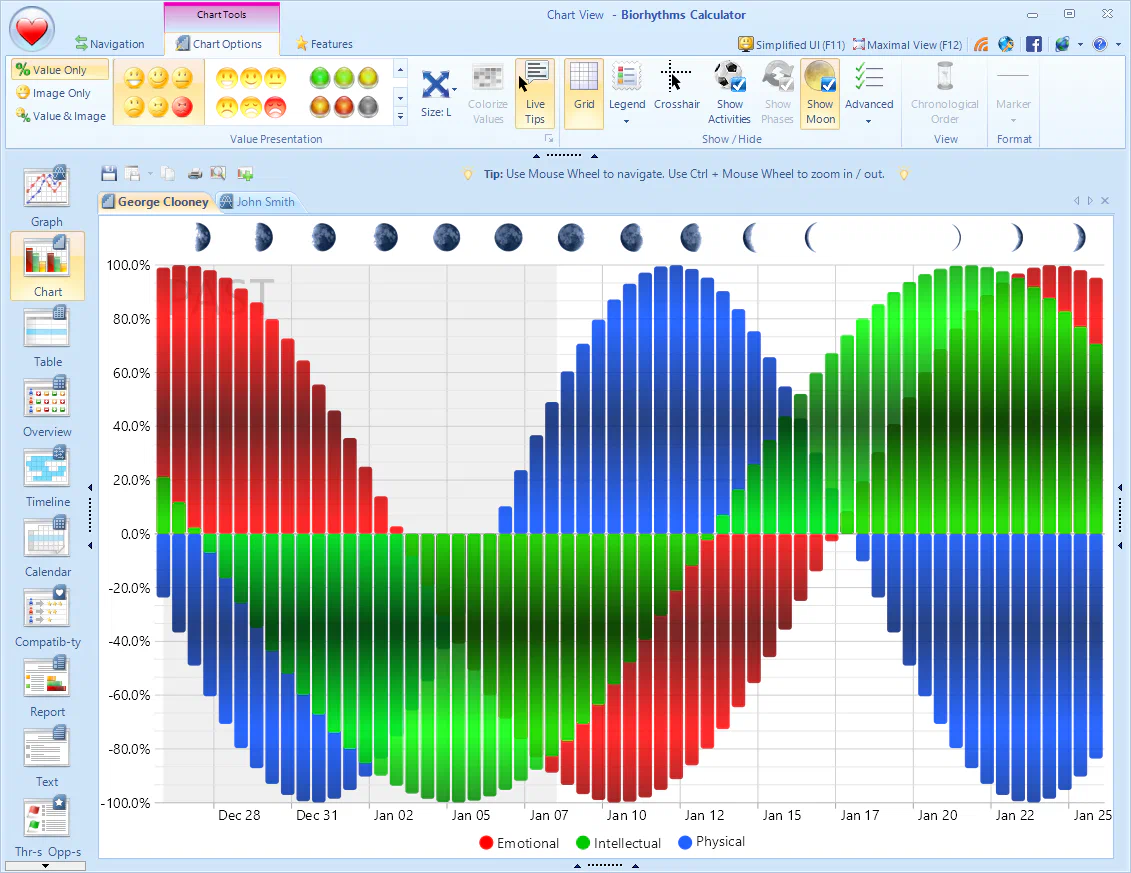
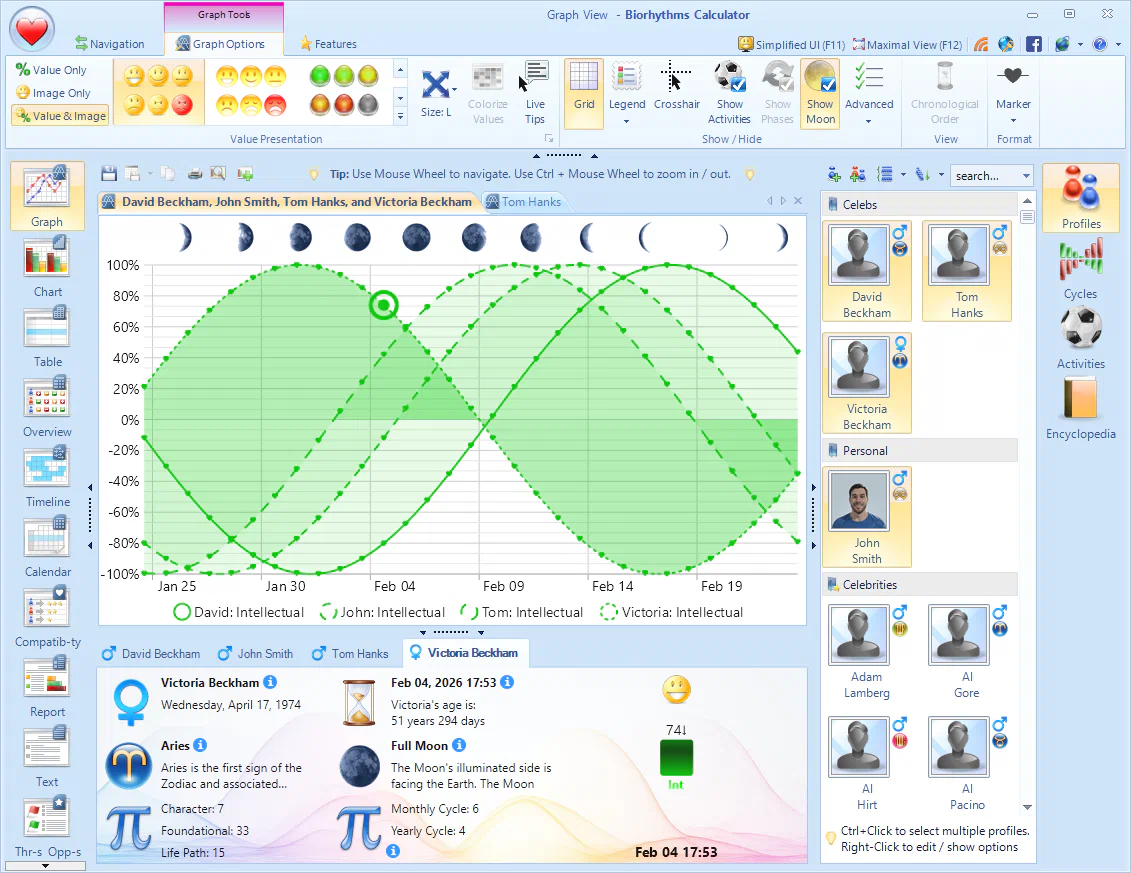
Visualize biorhythms with beautiful animated graphs and charts designed for style and clarity without sacrificing any detail.

- NEWAnimations: Graph and Chart views come with subtle animation effects as you hover, scroll, pan, and zoom. These animations are optional and can be disabled if you don't like them.
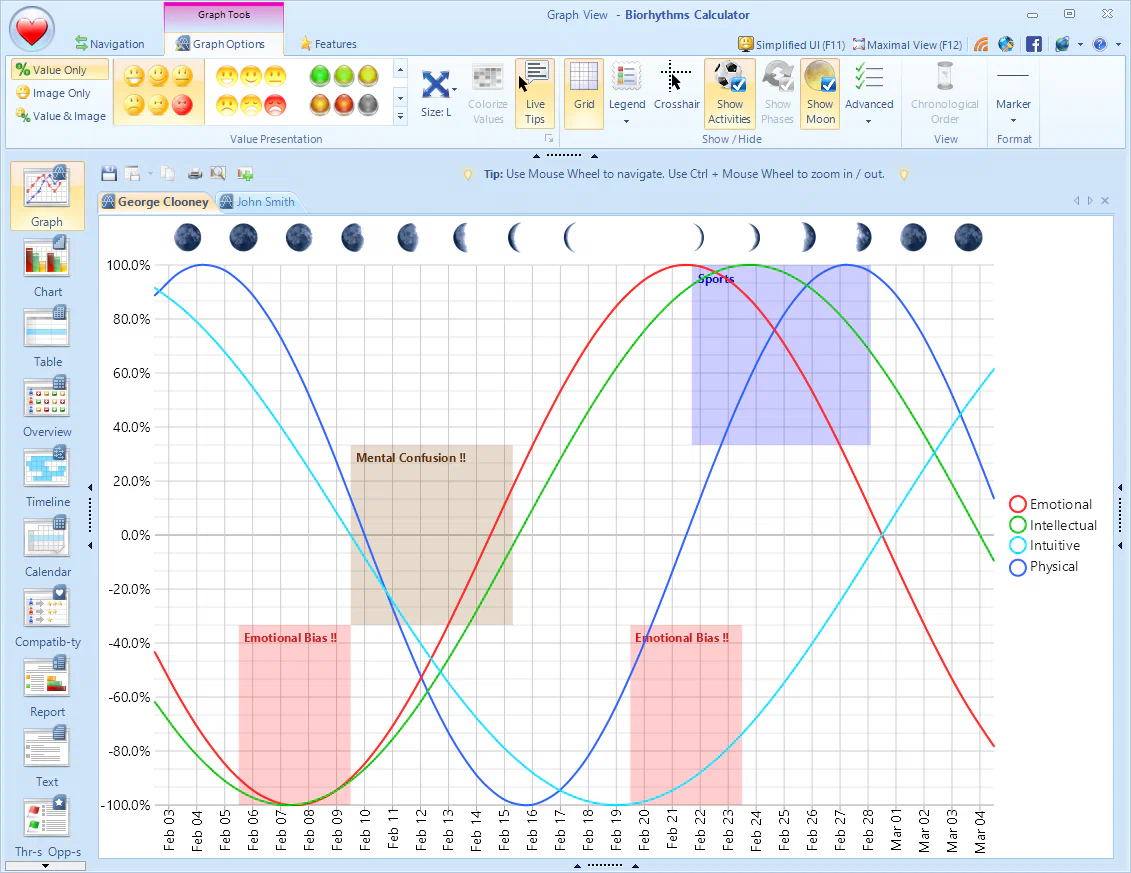
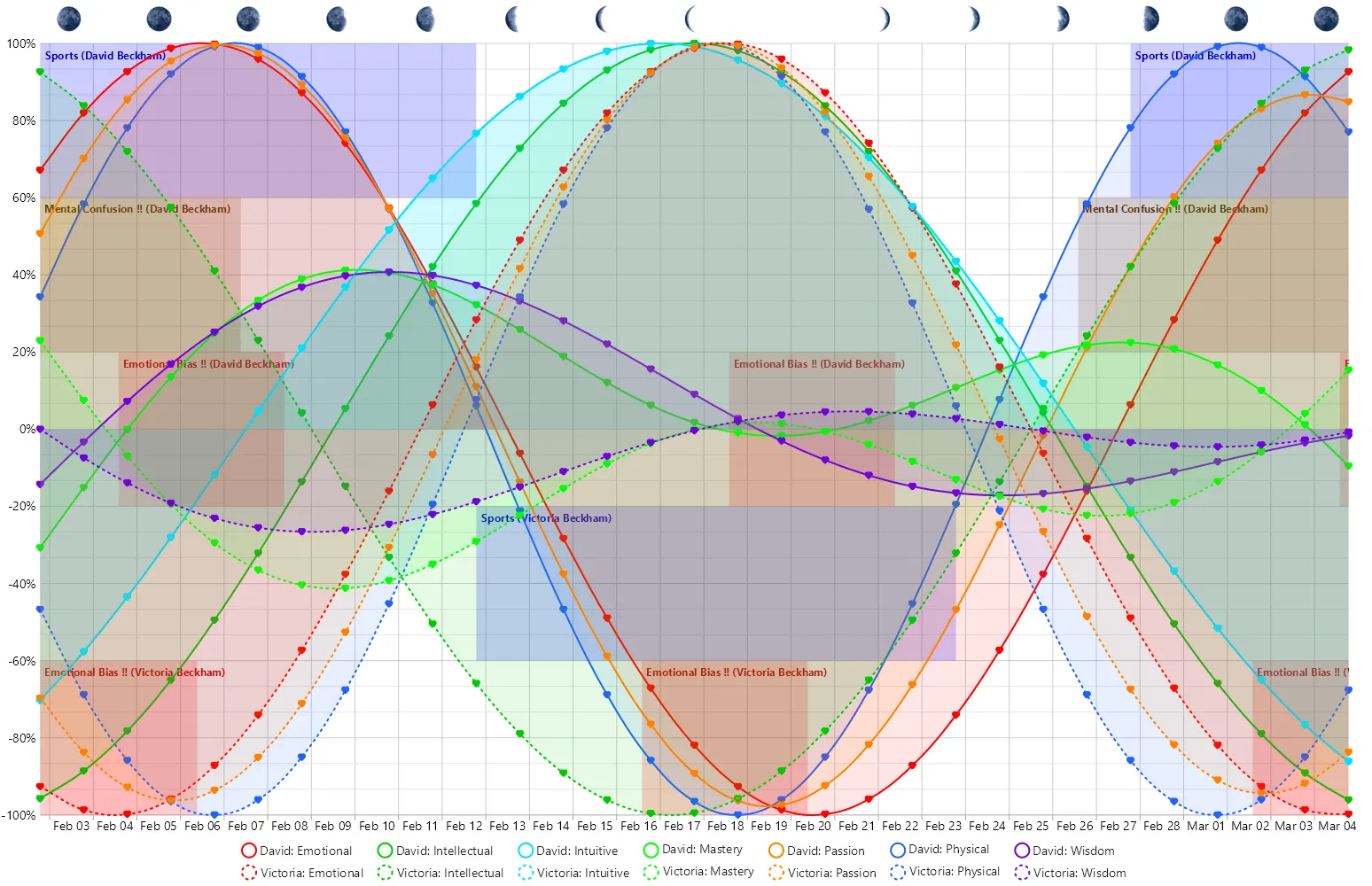
- NEWActivities can now be shown alongside biorhythm curves on the chart, making it super easy to see when an activity occurs without leaving the familiar biorhythm view.

- NEWInteractive Crosshair lets you see the precise date, time, and value of any point on the biorhythm curve, and the Info Pane updates automatically to reflect the data point you're hovering over.
- NEWLunar Phases can now be displayed at the top of biorhythm charts, which is helpful for understanding how the moon may affect your biorhythms.
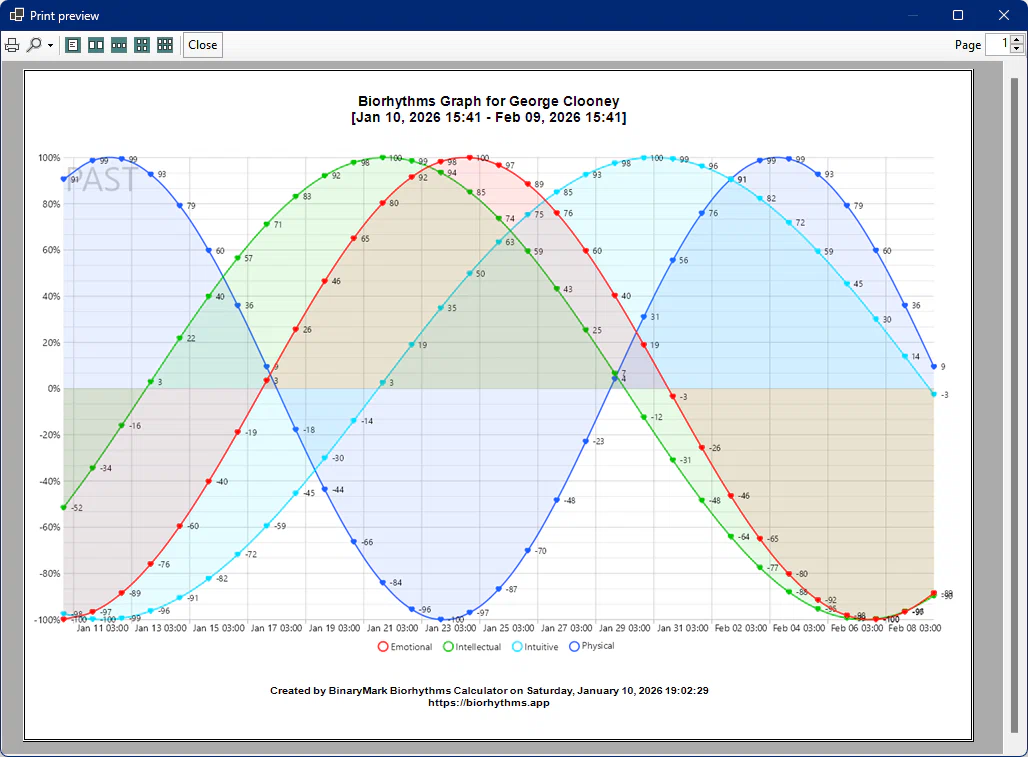
- NEWData Labels can now be shown on the biorhythm curves, so you can see the exact biorhythm values at any point in time.
- NEWPast Marker can be toggled to indicate the current date, making it easier to distinguish between past and future points on the chart.
- NEWSave your biorhythm charts in new formats: PDF and WebP, which are more efficient and can be shared more easily than older formats.
Biorhythm Coincidences
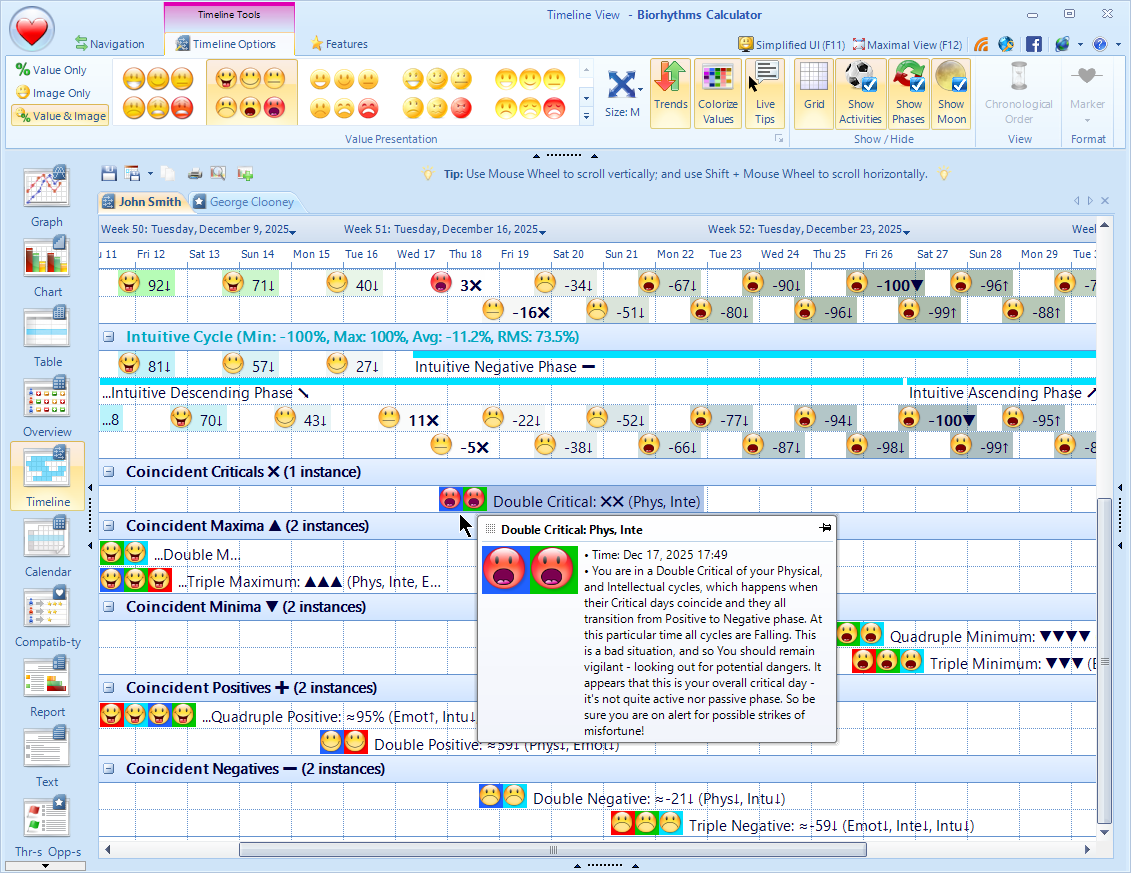
You can now see all times when 2, 3, or 4 biorhythm cycles meet or intersect, so you are alerted in advance when such rare events will occur. For example cycle coincidences like double-critical days or triple intersections will be shown in various views including Calendar, Timeline, Threats and Opportunities.
- NEWSupports up to 4 cycles: double, triple, and quadruple coincidences and intersections.
- NEWSupports different types of intersections: critical days, transition days, minimum and maximum days, positive and negative intersections.
- NEWAll types of cycles are supported: period-based, combination, and custom cycles.
- NEWAccessible from various views: Calendar, Timeline, Threats and Opportunities.
- NEWAll cycle coincidences can be easily exported to iCalendar IC… for use in your favorite calendar application, so that you won't miss any such important events.
Biorhythms Cycle Improvements
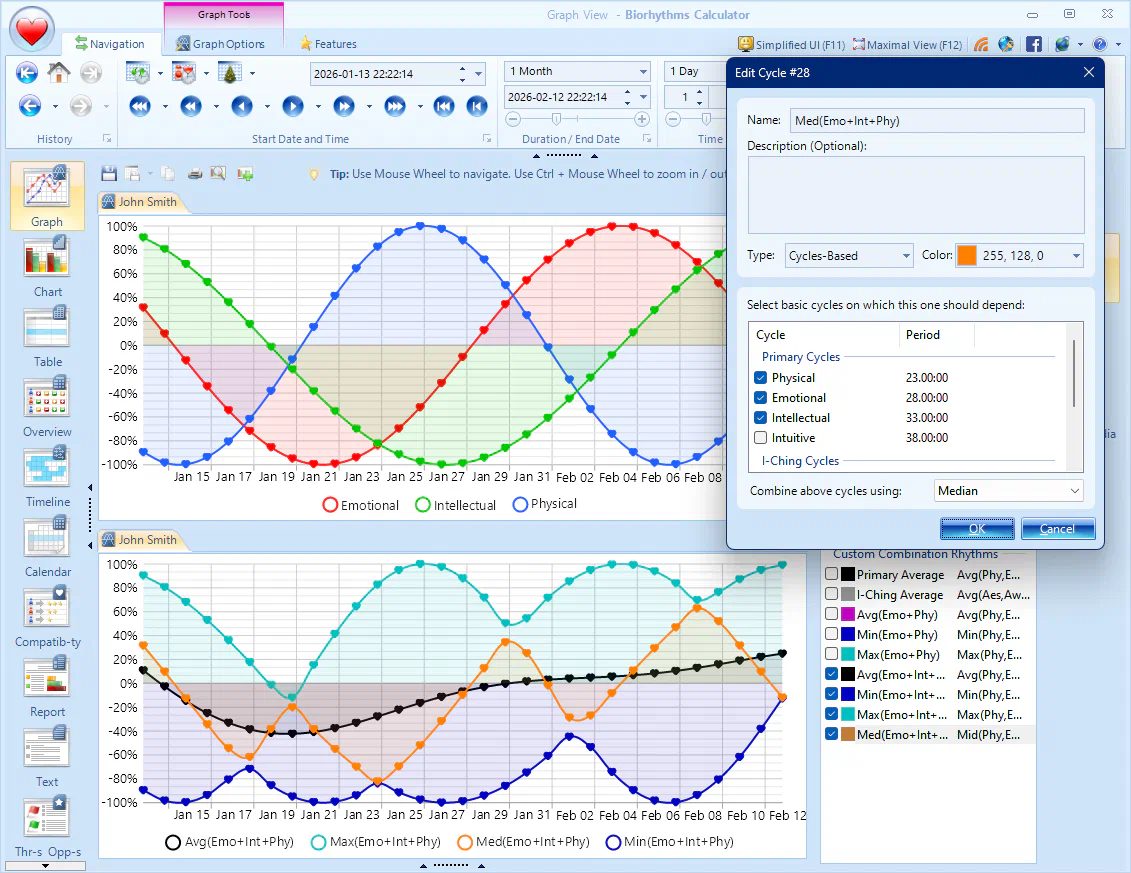
Biorhythms Calculator 2026 now supports new combination cycle types, extended periods of up to 9,999 days, and ability to display cycle phases in various views.
- NEWNew ways to combine cycles: In addition to the Average combination type, when defining custom cycle you can combine constituent rhythms using Min, Max, and Median cycle combination types.
- NEWExtended Custom Cycle Periods: You can now create cycles that last up to 9,999 days, which is useful for long‑term tracking.
- NEWDisplay Cycle Phases: You can now display the phases of each cycle in various views, making it easier to understand the cycle's behavior.

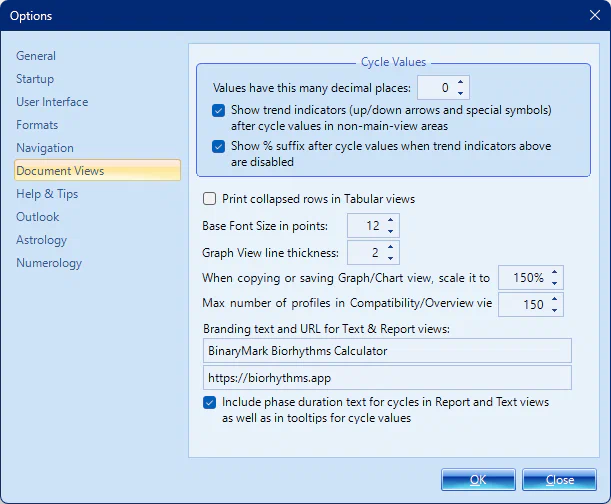
- NEWBiorhythm Trend Indicators that mark a point on a cycle as either falling/rising, critical/zero, or minimum/maximum will be displayed next to the biorhythm value in all views. This allows you to instantly see not just the current biorhythm state, but also the direction of change over time, thus helping you make better decisions based on your biorhythm trends.
Import Profiles from Excel, CSV, vCards
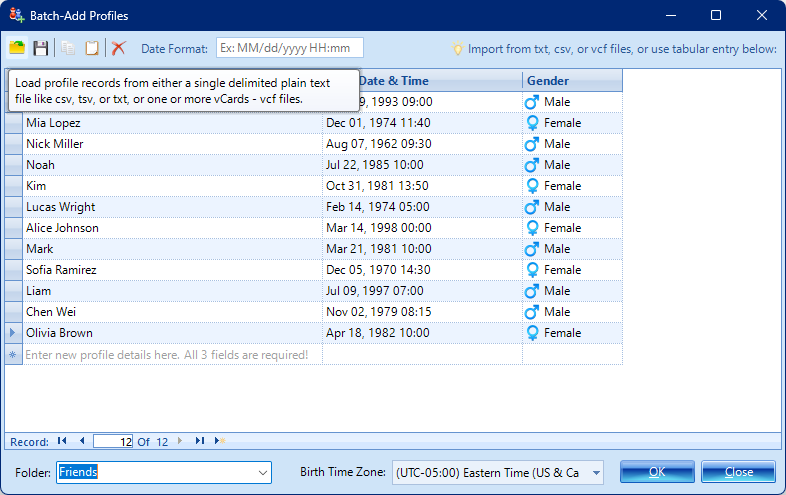
Add more profiles easily from various sources: batch-import profiles from Excel or CSV files, or from VCF vCards.
- NEWBatch-Import Profiles: You can bulk‑import multiple people and add many profiles at once from various sources like Excel or CSV files, or from VCF vCards. A user‑friendly grid interface allows you to preview and edit data before saving it in the program.
- NEWCreate Profiles from VCF vCards: You can create profiles from VCF vCards, which are commonly used for storing contact information on mobile devices and in email clients, thus making it even easier to add all your family and friends into the program.
Timezone-Aware Biorhythms!
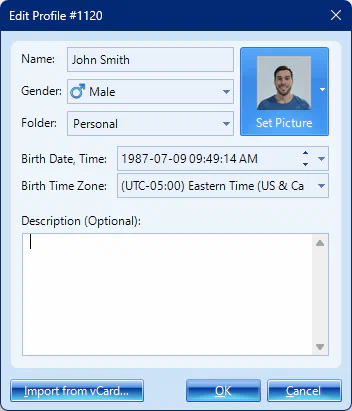
Biorhythms Calculator 2026 now has full timezone awareness for precise biorhythm calculations, this includes birth time zone and display time zone settings.
- NEWBirth Timezone: You can now set the timezone for each profile, ensuring that all biorhythm calculations are based on the correct birth time. This is especially useful if you have profiles for people in different parts of the world, and you want to track their biorhythms accurately.
- NEWDisplay Timezone: You can also specify the timezone used for displaying all dates and times in the application UI, allowing you to see the information in the time zone that is most convenient for you.
Major Activities Improvements
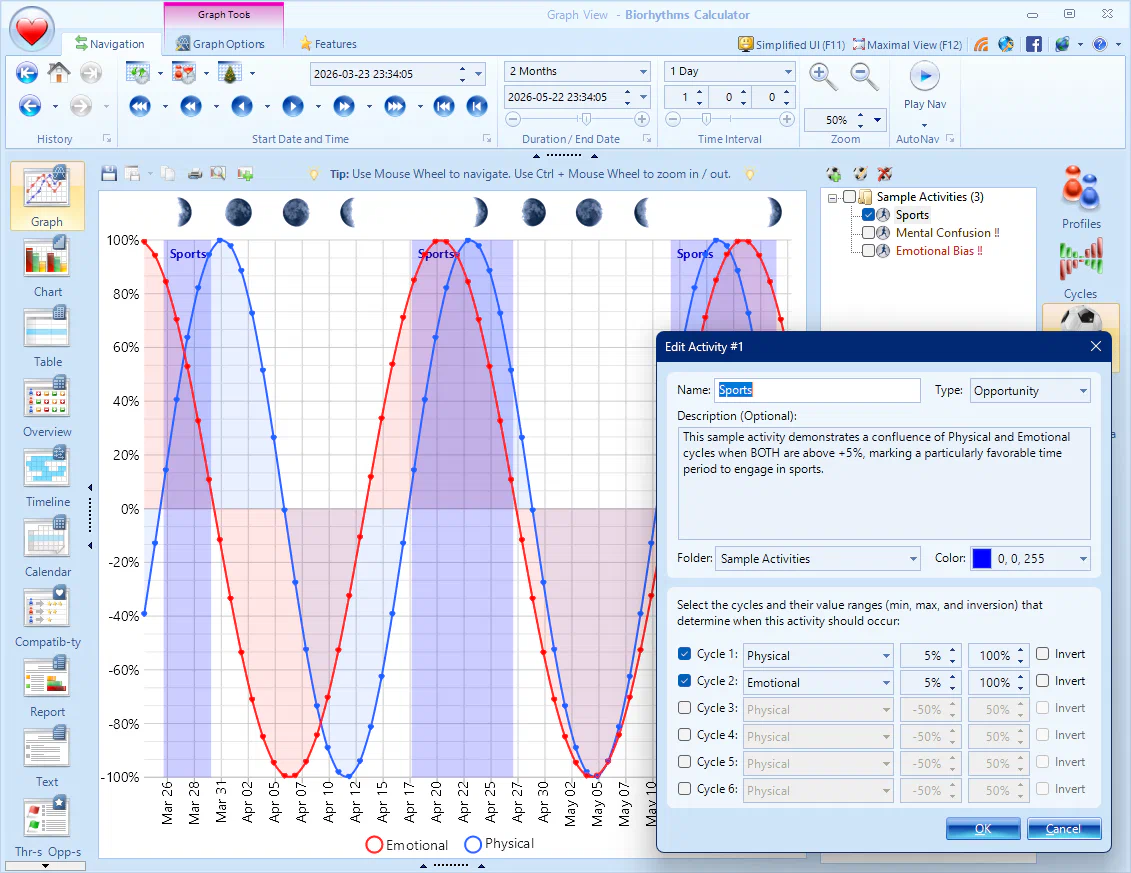
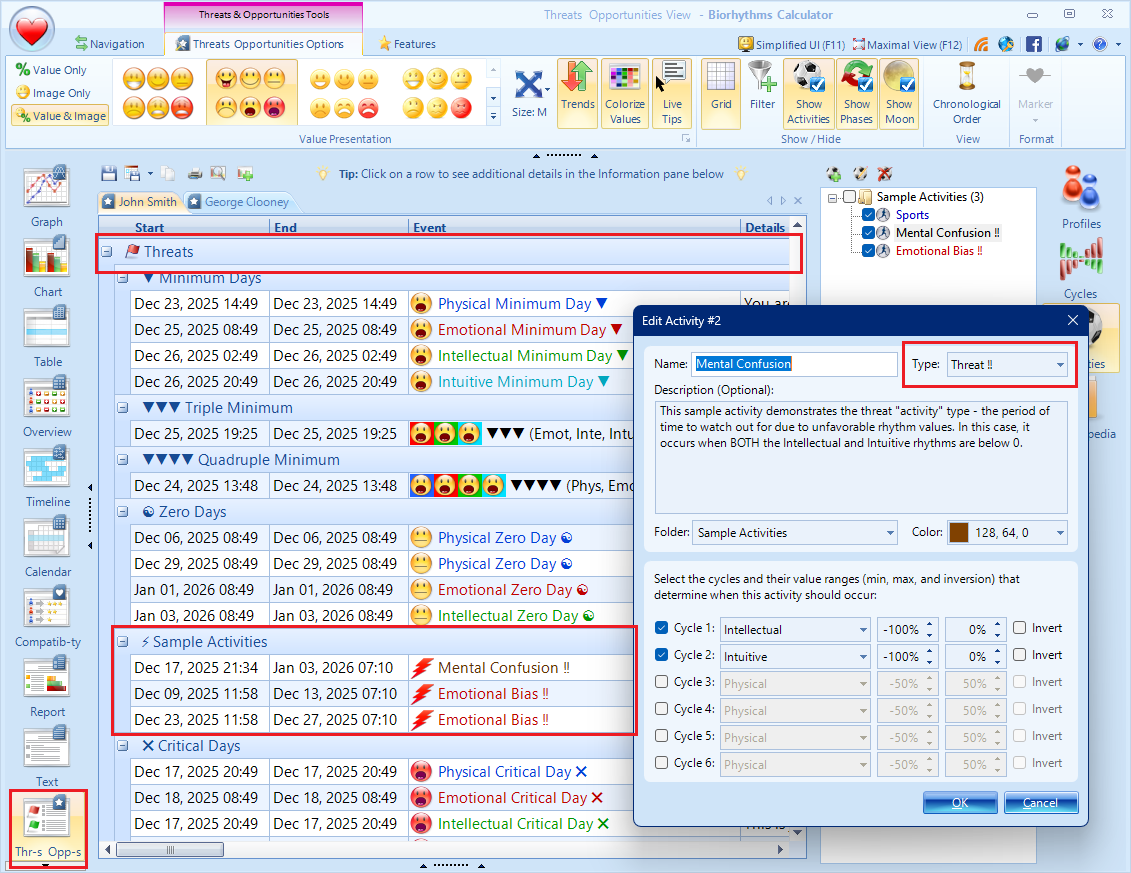
Activities are now supported on biorhythm charts, can be assigned a specific color, may be defined using inverted biorhythm value ranges, and can be designated as "anti" to indicate them as periods of time to stay alert.
- NEWActivities can now be shown directly on biorhythm charts, making it easier to see when an activity occurs without leaving the familiar biorhythms view.
- NEWYou can now assign a specific color to each activity, making it easier to distinguish between different types of activities being displayed in various views.
- NEWActivities can be defined using inverted biorhythm value ranges that allow for gaps. For example, you can define an activity that excludes transition periods like Zero days and Critical days be specifying the range to be from -100% to -10% and from +10% to +100%, thus excluding the transition zone of -10% to +10%.
- NEWAnti-Activity Category allows you to define periods of time to stay alert. These activities are shown in a different style from, regular activities, so you can see at a glance they represent unfavorable time periods.
More Export & Sharing Formats
You can now save, export, and share biorhythms in more formats: iCalendar, PDF, WEBP, CSV, and others.
- NEWGraphs and Charts can now we saved as PDFs or modern WEBP images, and you can specify scaling factor letting you to control the resolution and quality of the output, including clipboard copy option.
- NEWBiorhythm events from Calendar, Timeline, Threats and Opportunities views like critical/zero days, cycle phases, etc. can now be exported as iCalendar ICS files for use in your calendar app.
- NEWTabular Views can now be exported as CSV files.
- NEWReports can be exported in plain text format.
- NEWImproved Printing Support with better layout, customizable headers and footers, higher quality and resolution prints, and support for more views.
Major Functional & UI Improvements
User Interface has been improved with new functionality, better ease of use, and refreshed look.
- NEWNew Period Averages Section in InfoPane can display biorhythm averages for the selected period.
- IMPROVEDAnimated Icons in the InfoPane reflect biorhythm trend changes visually with their motion whenever selected view item changes.
- IMPROVEDPinnable Tooltips allow you to keep detailed tooltips visible as you navigate, making it easier to compare different biorhythm events.
- IMPROVEDConsistent Terminology across the application to ensure clarity and avoid confusion.
- IMPROVEDDate/Time entry and presentation is now consistent and respects your formats.
- IMPROVEDImproved Live Biorhythm Tips have more detailed wording, clearer descriptions of phases and subphases, and more nuanced meanings.
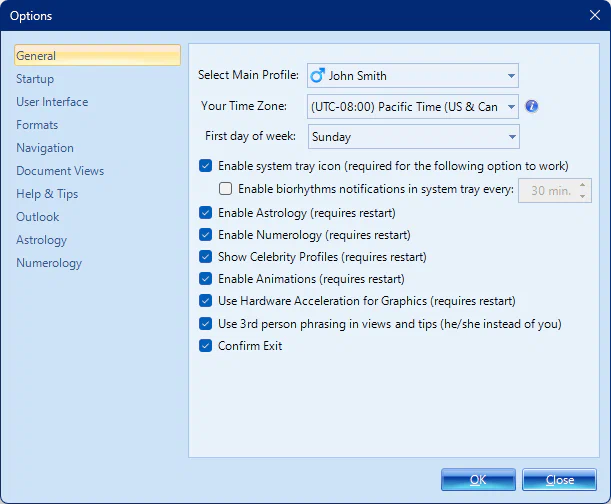
- IMPROVEDOptional features like Animations, Celebrities database, Astrology, Numerology can be turned off if you don't like or need them.
Ready to Experience These Enhancements?
Upgrade today and take advantage of your time-limited discount!
Improved Biorhythm Views
All Views have been greatly improved: from increased font size for better readability, to sorting and filtering in tabular views, to moon phase display, to hot‑tracking with live tips, and more.
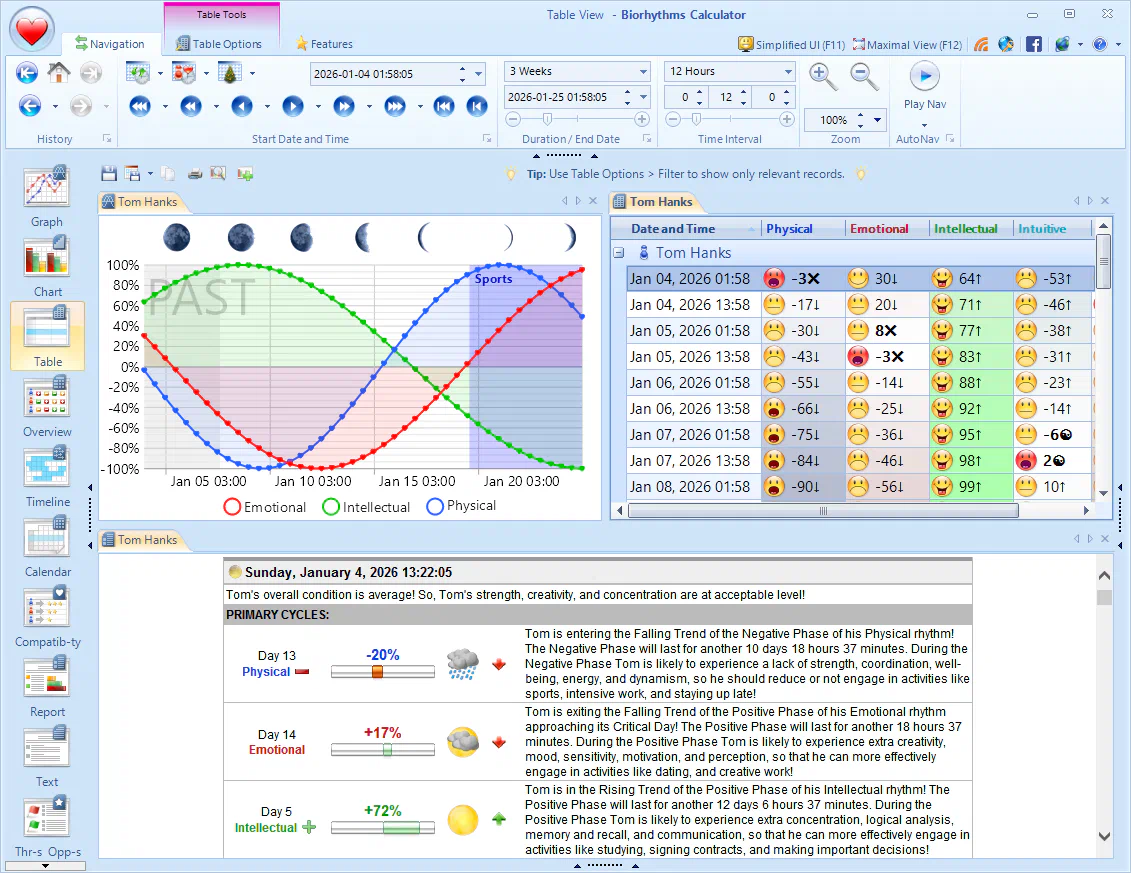
- NEWFont Size in most views has been improved for easier reading, with clearer distinction between small, medium, large, and extra‑large scales which you can also further customize.
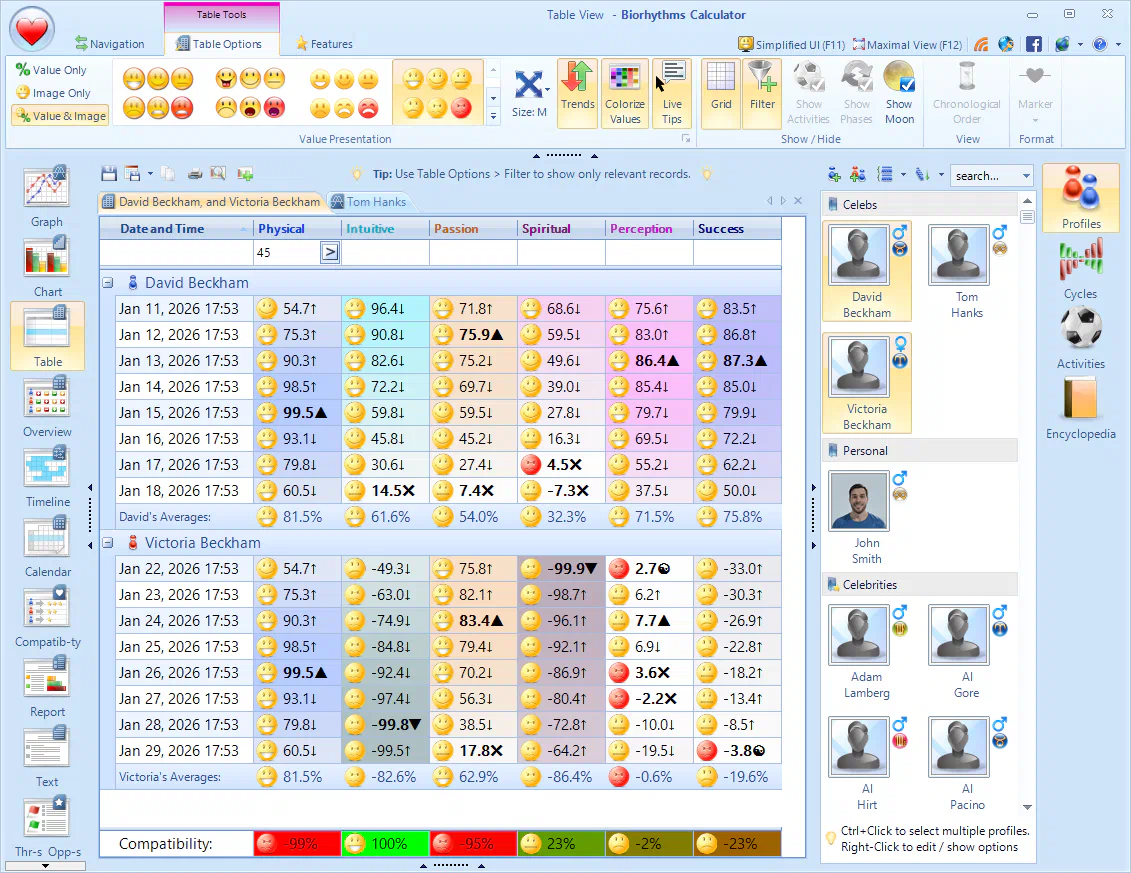
- NEWSorting and Filtering of rows is now supported in all Tabular views: Table, Compatibility, Overview, Threats and Opportunities, and Journal. So now you can quickly find times or profiles with desired biorhythm states.
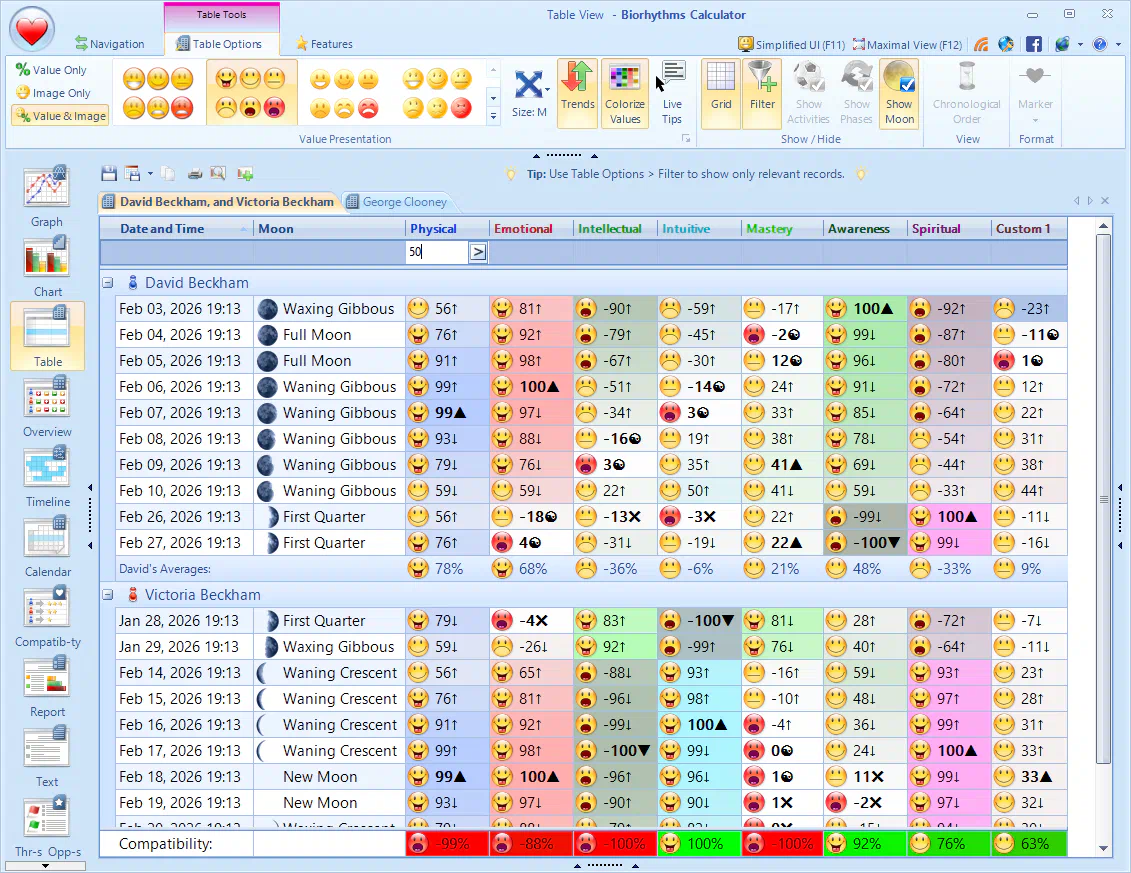
- NEWMoon Phase information can now be displayed in more views (Graph, Chart, Table, Timeline), making it easier to track your lunar phases in relation to your biorhythms.
- NEWReport views now support cycle color‑coding and biorhythm trend indicators. They also have separate section for "anti" activities.
- NEWAbility to choose between 2nd‑person (you) vs 3rd‑person (he/she/they) styles in all reports, view texts, and tooltips for either more personal or professional presentation.
- NEWHot‑Tracking and Live Tips are now supported in most views, so that you will see contextual tooltips with detailed biorhythm information when you hover over various items, giving you more context and insights. These tooltips can be pinned now, so you can keep them visible as you navigate.
Table View Improvements

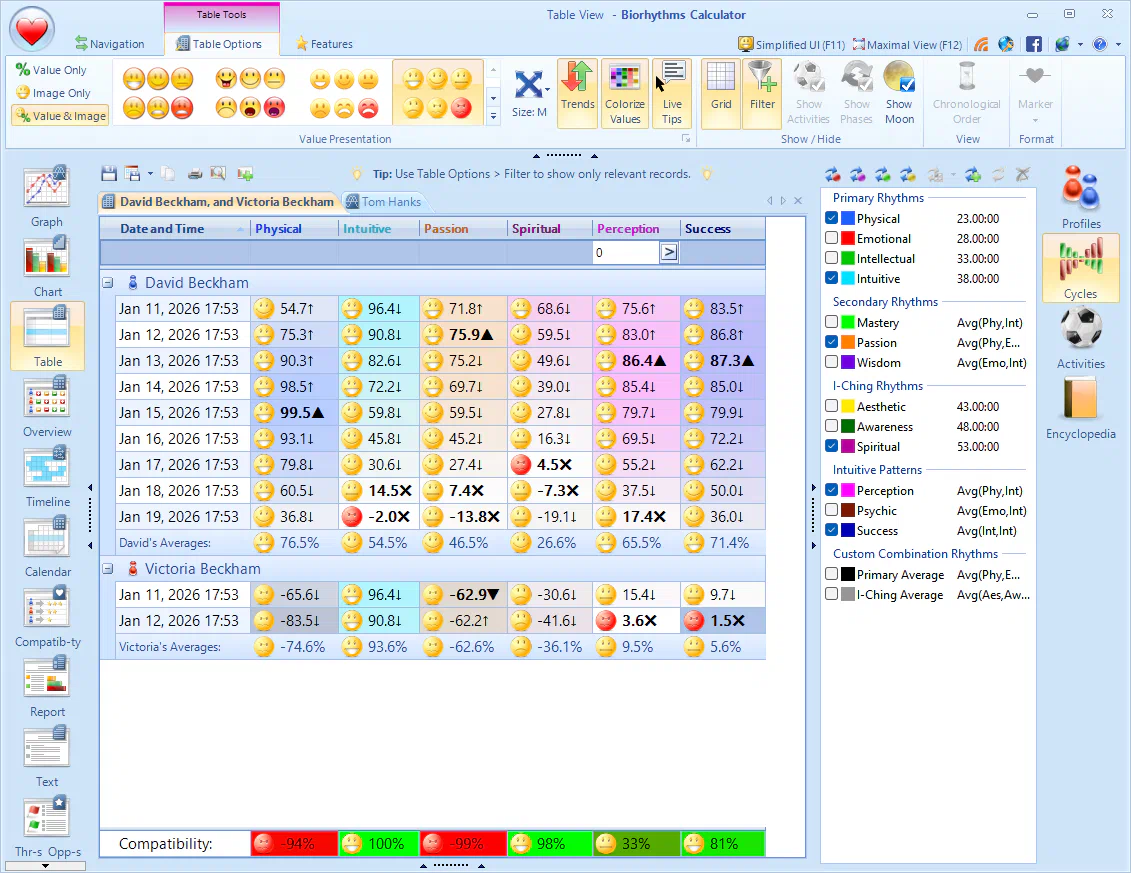
- NEWHeatmap Color Coding helps you to quickly identify trends and spot important days in your biorhythms by using a heatmap‑like colorization scheme. Whiter cells represent critical/zero days, darker cells represent negative phases, and brighter cells represent positive phases.
- NEWSummary Statistics are now included at the bottom showing RMS averages for a given time period across all selected cycles.
- NEWCompatibilities for Multiple Profiles are now displayed at the bottom, letting you easily see which cycles are in harmony with each other, and which are not.
- NEWFiltering Capability lets you quickly drill down to biorhythm states you are interested in, hiding others.
- NEWActive Cell Hot‑Tracking highlights the cell you are currently hovering over and displays tooltip with detailed biorhythm information.
- NEWCritical Values and other Key Values are now automatically highlighted in bold for easy identification.
- NEWAutomatic Column Sizing ensures that columns are sized appropriately to fit the content without manual intervention.
Calendaring Improvements
- NEWiCalendar Export: You can easily export key biorhythms events like critical/zero days, maximum/minimum days, cycle phases, activities, and more to various calendaring applications in universal iCalendar ICS
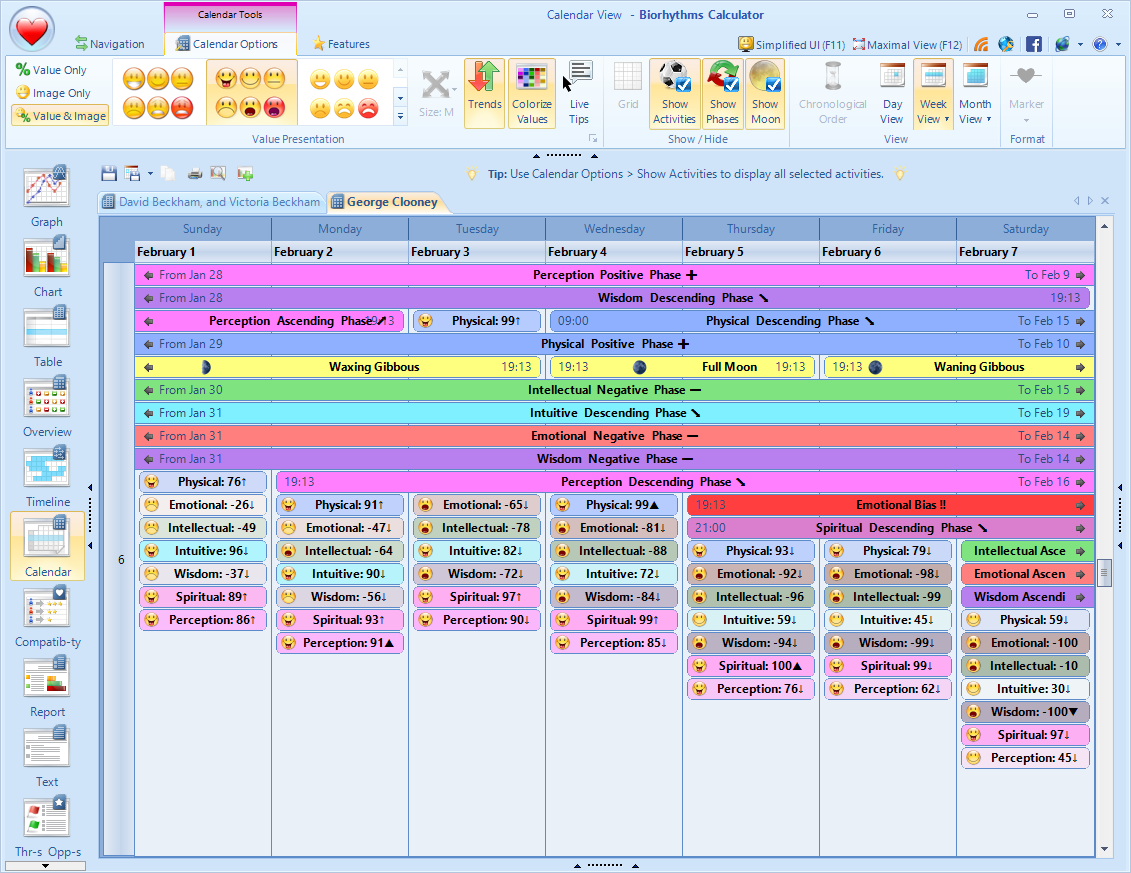
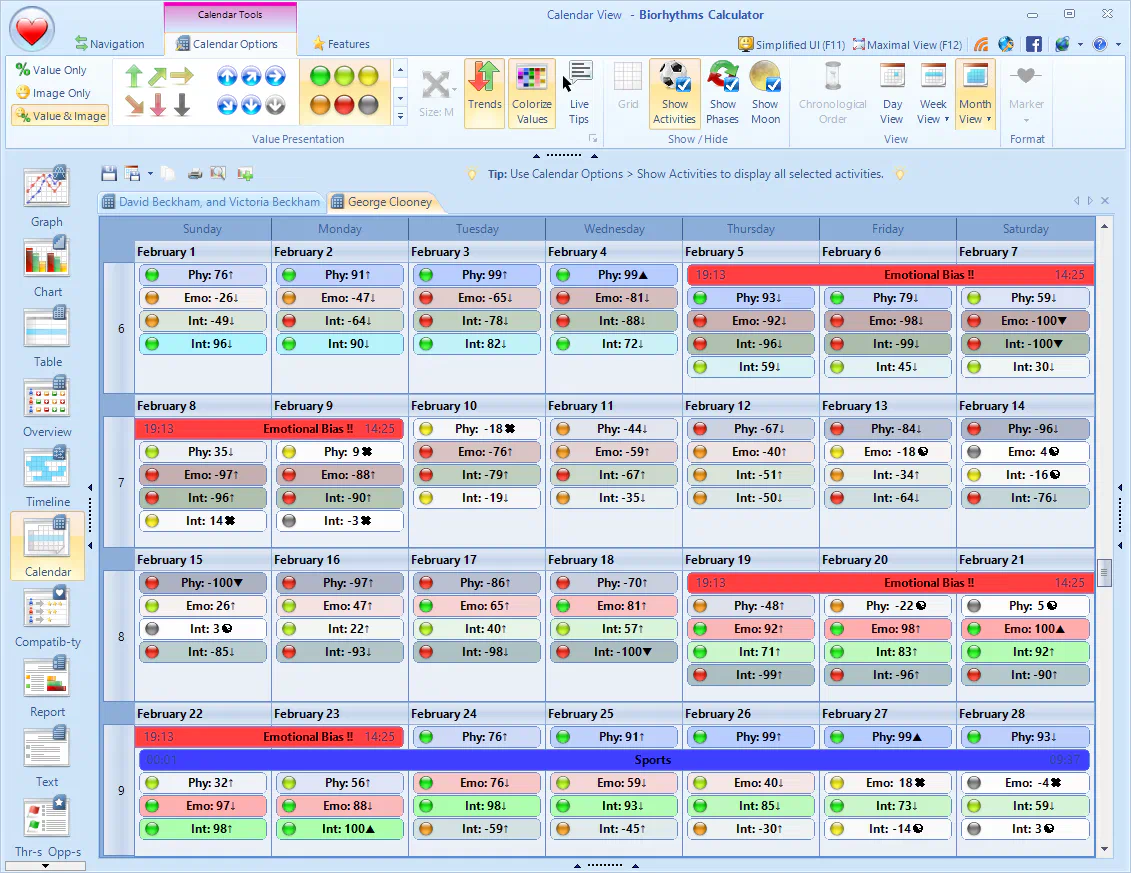
- NEWHorizontal Week Layout: Shows the entire week in a single row, making it easier to view the entire week at a glance, especially useful when there are many items to display.
- NEW2-Week and 3-Week Layouts: Allows you to view multiple weeks at once, making it easier to track your biorhythms over longer periods while still providing much detail.
- NEWHeatmap Color Coding helps you to quickly identify trends and spot important days in your biorhythms by using a heatmap‑like colorization scheme.
- NEWActivities and Cycle/Lunar Phases can span multiple days, making it easier to see how your activities and cycles interact with your biorhythms over time.
- NEWBiorhythm Trend Indicators provide visual cues about the direction a given cycle is trending.
- NEWImproved Printing Support makes it easier to print your biorhythm calendar in just the right format.
Improved Timeline View
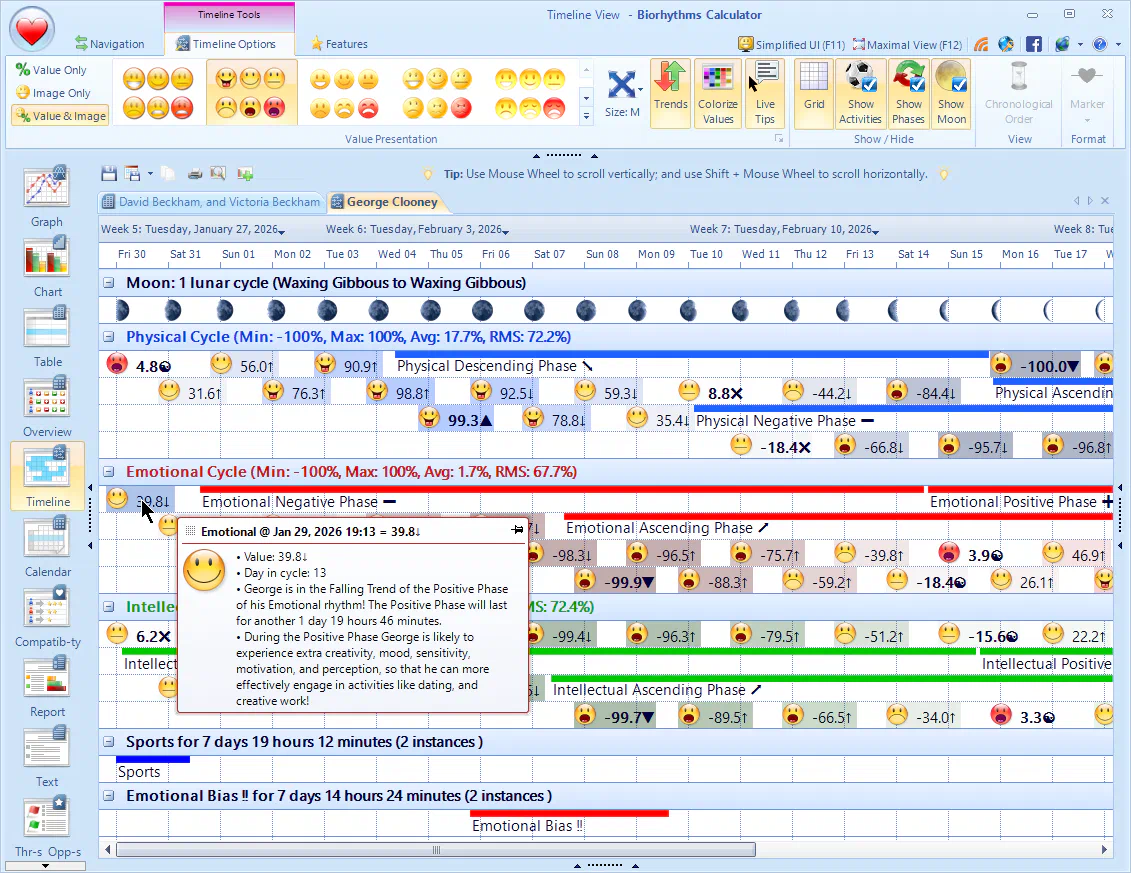
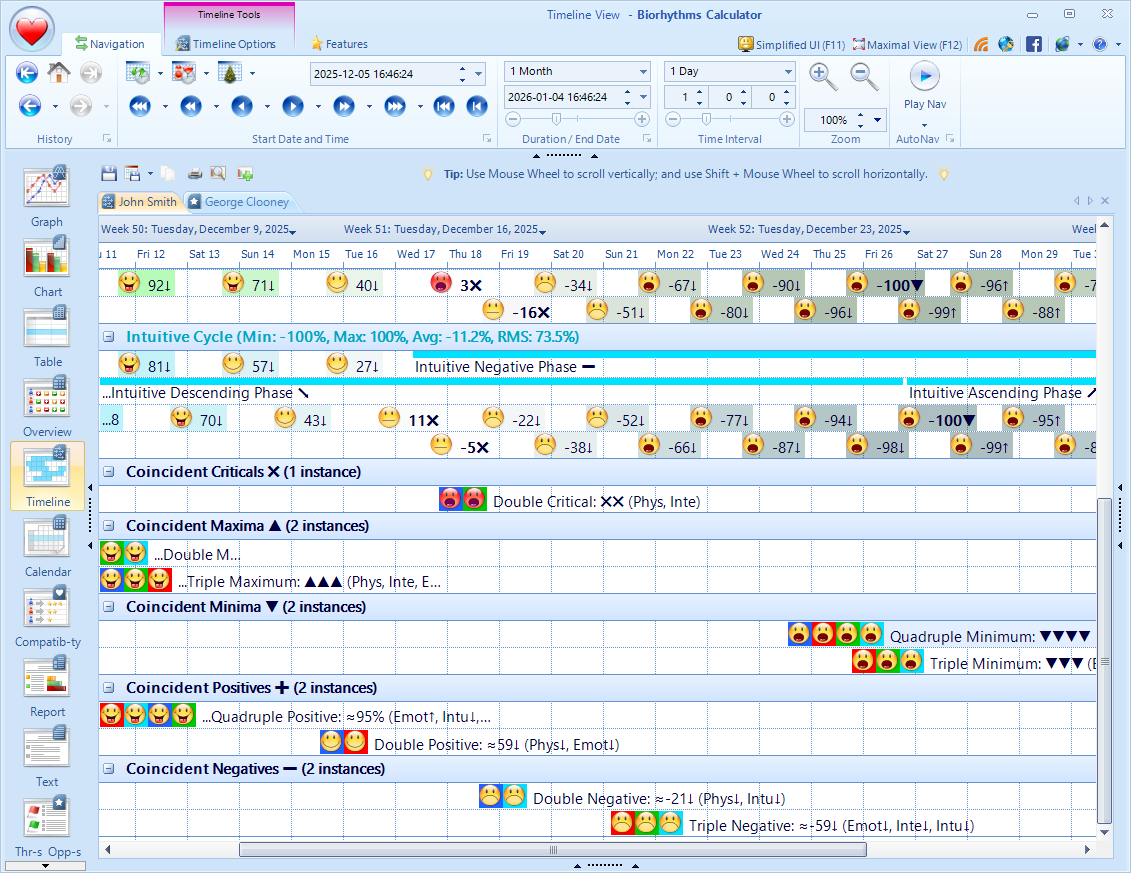
- NEWCycle Phases and Lunar Phases can now be displayed on the timeline view, making it easier to track your biorhythms in relation to the moon.
- NEWBiorhythm Summary Statistics let you know minimum, maximum, and average RMS values for each cycle for the displayed time period.
- NEWActivity Summary Statistics let you know how often a given activity occurs over a given period as well as its total duration, allowing you to get a quick overview of favorable and unfavorable time periods - ideal for biorhythms‑empowered planning.
- NEWHeatmap Color Coding helps you to quickly identify trends and spot important days in your biorhythms by using a heatmap‑like colorization scheme.
- NEWBiorhythm Trend Indicators provide visual cues about the direction a given cycle is trending.
- NEWLive Item Tooltips will be displayed as you hover over items, providing detailed contextual information about the item.
- NEWKey Biorhythm Values like critical days are now highlighted in bold, making it easier to identify trends and spot key biorhythm events.
- NEWImproved Printing Support ensures that you can print your biorhythm timeline in the most optimal way.
Threats & Opportunities Improvements
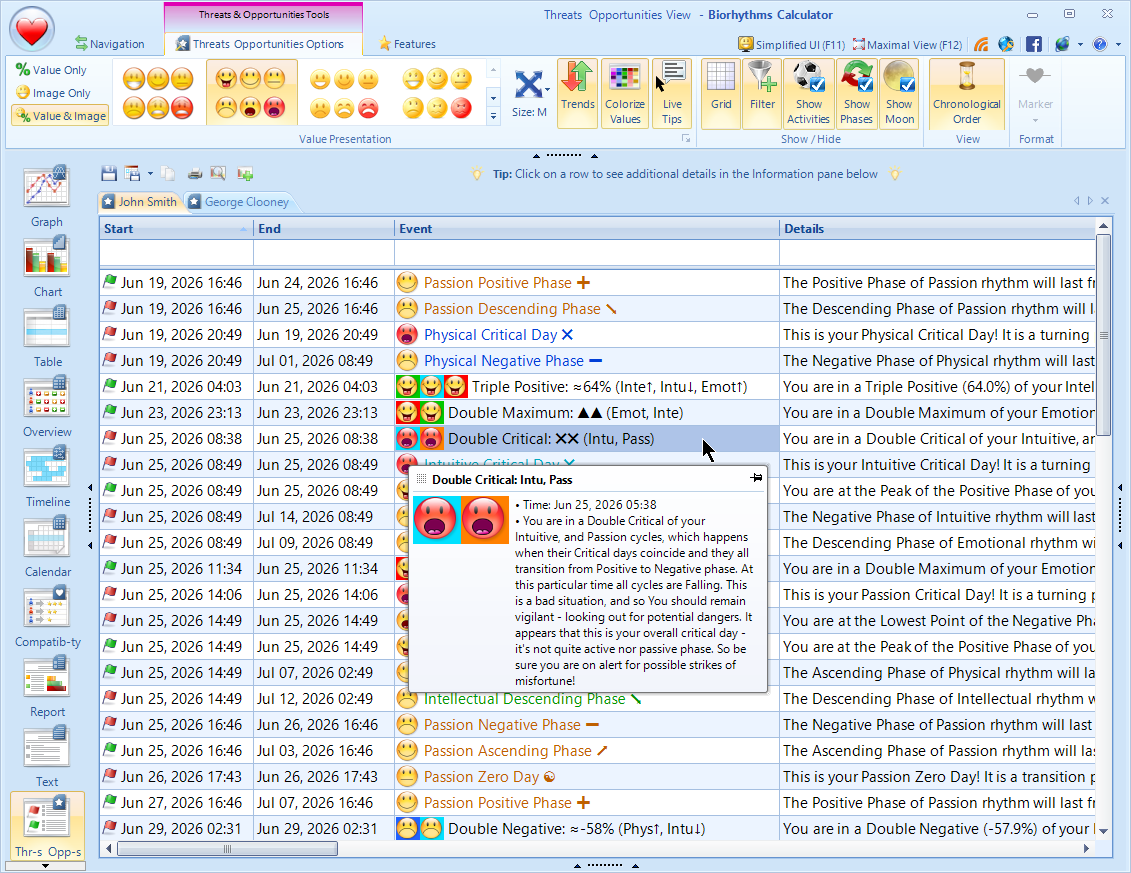
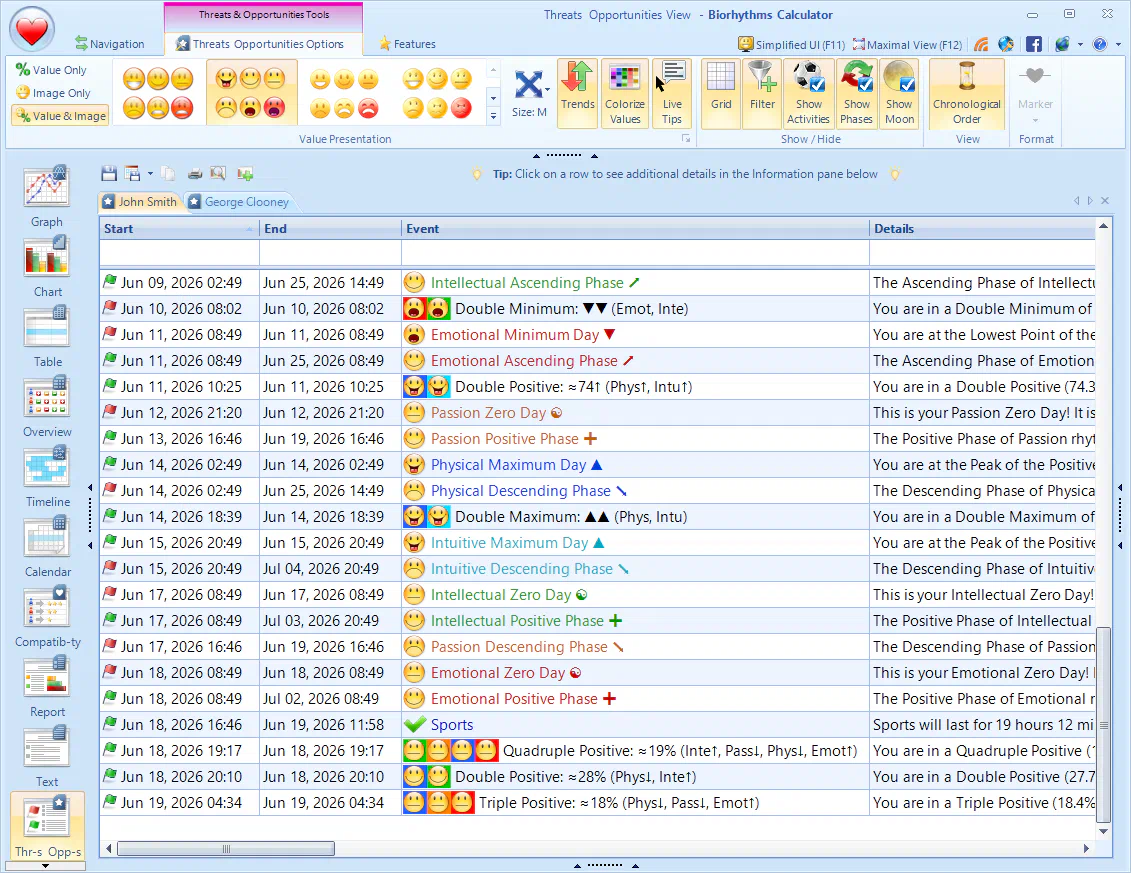
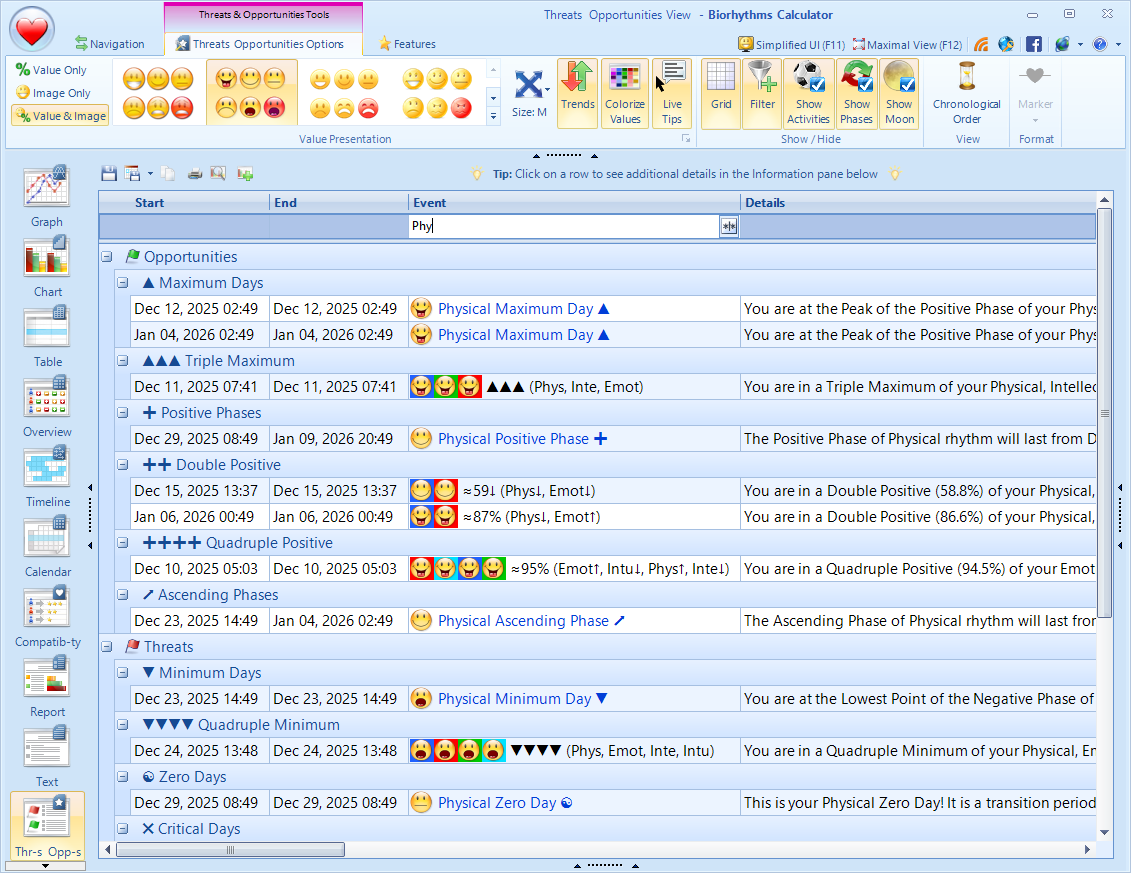
- NEWCycle Coincidences - events where 2 or more rhythms meet at the same time or intersect, e.g. double-critical days or triple maximum days are now displayed in their own categories, making it very easy to find all such occurrences.
- NEWCustom Cycles are now fully supported (including composite cycles), so you can see their critical, transition, and extremal days as well as phases and trends.
- NEWCycle Phases - positive/negative and Trends - rising/falling are now fully supported as well, so you know exactly how long each biorhythm phase or trend will last.
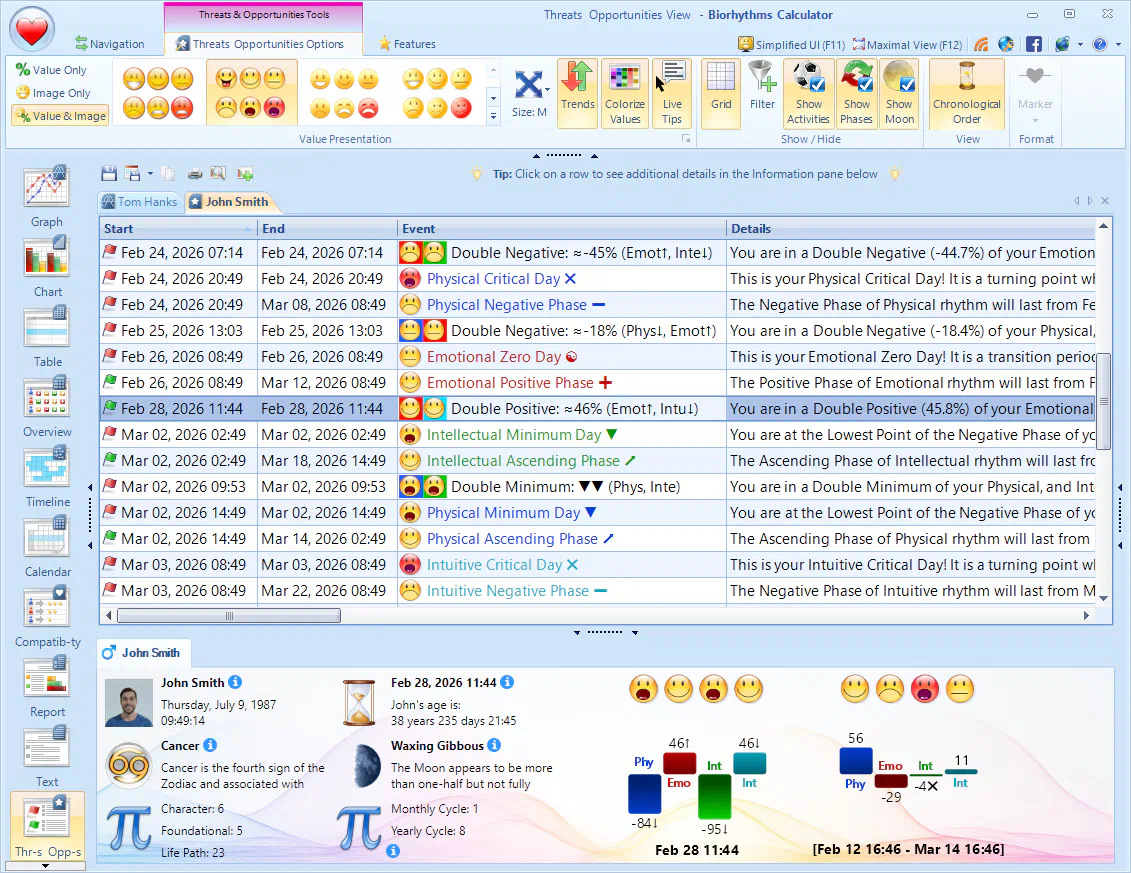
- NEWDetailed descriptions are now shown next to all displayed events providing detailed explanation of the event's significance and its effect on you.
- NEWIcons and Trend Indicators provide visual cues that help you distinguish different biorhythm events.
- NEWSorting and Filtering of biorhythm events based on various criteria make it easy to find the information you need.
- NEWExport of Key Biorhythm Events to iCalendar IC… lets you use this information in various calendaring applications like Google Calendar or Outlook so you are automatically alerted about potentially positive or negative biorhythm events ahead of time.
- NEW"Anti"-Activities are now supported under "Threat" category, so you can see when you are more prone to stress, illness, or negative events.
Improved Multi-Profile Views
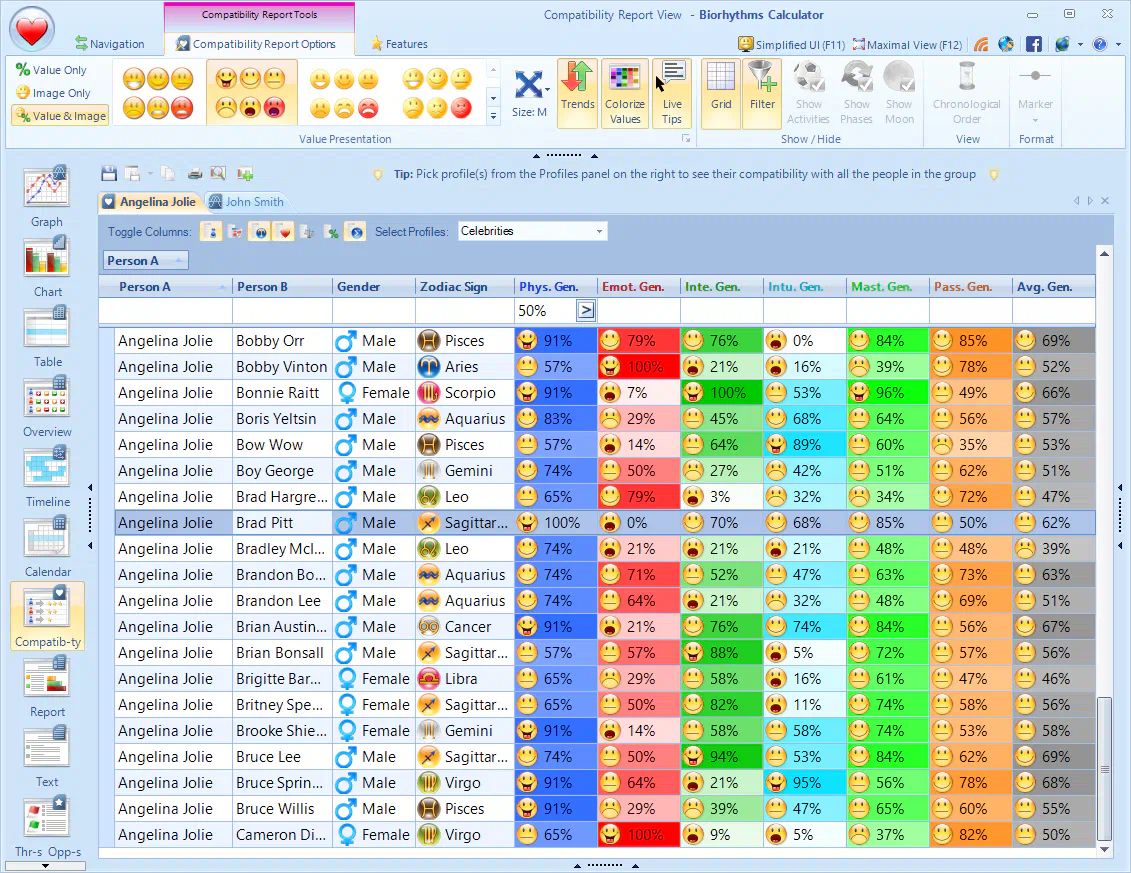
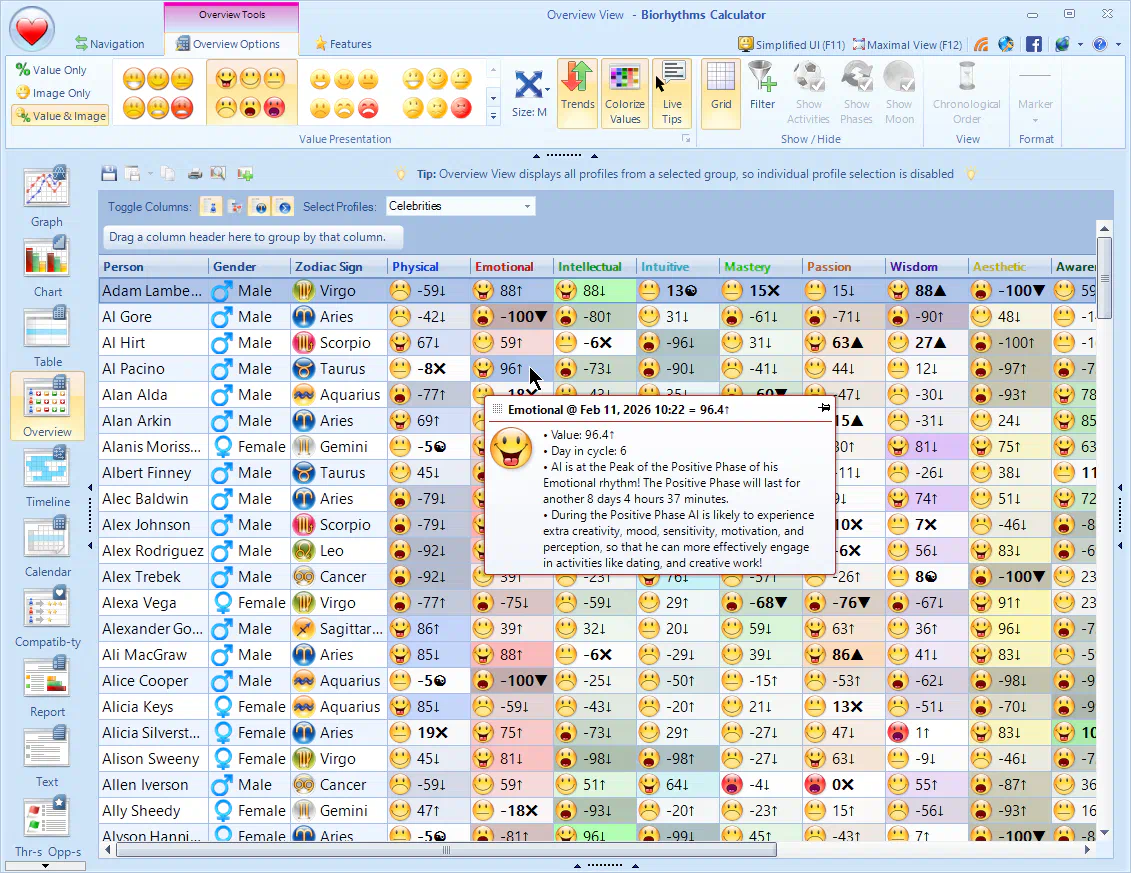
- NEWHeatmap Color Coding helps you to quickly identify trends and spot important days in your biorhythms by using a heatmap‑like colorization scheme.
- NEWRow Filters let you quickly find profiles with desired biorhythm states. For instance, you can see only the profiles whose Physical biorhythm is above 50%.
- NEWActive Cell Hot‑Tracking highlights the cell you are currently hovering over and displays tooltip with detailed biorhythm information.
Biorhythm Journaling Improvements
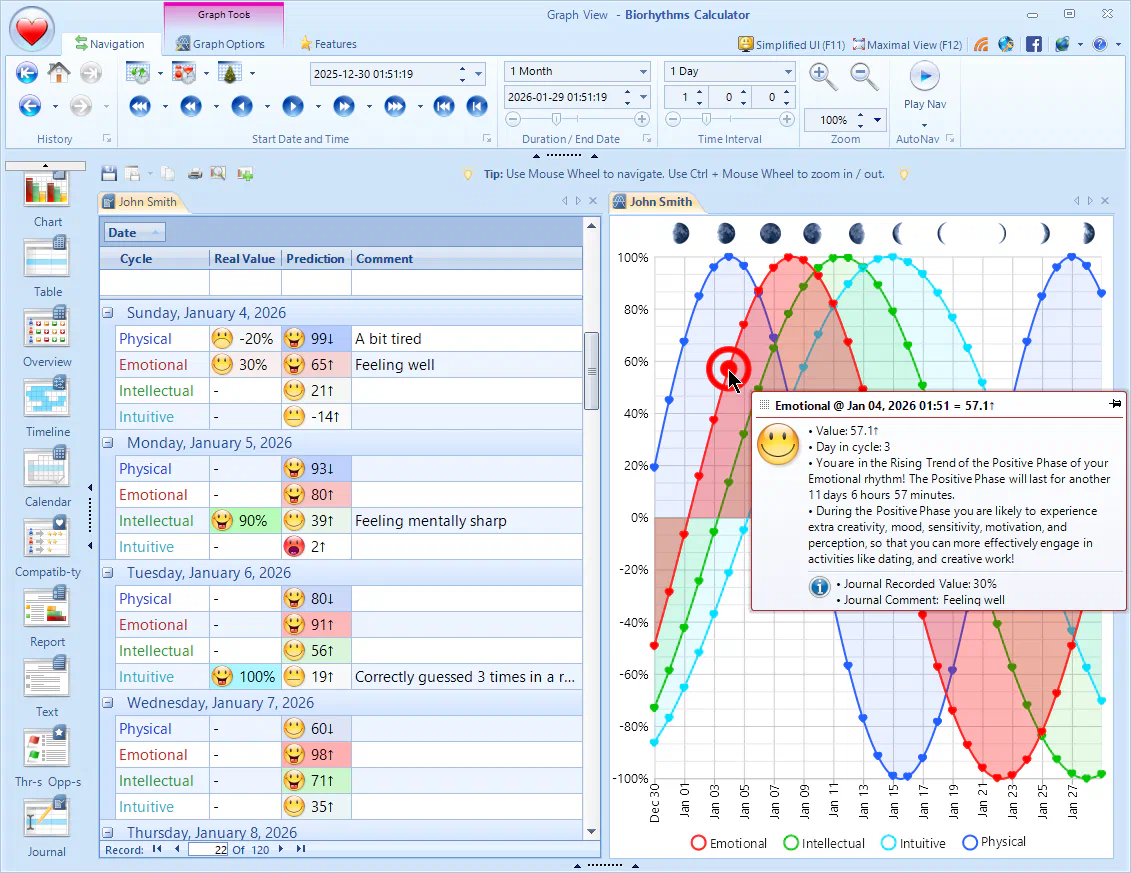
- NEWBetter Readability thanks to increased font size and cycle value colorization.
- NEWSorting and Filtering of journal entries allows you to find specific entries more easily.
- NEWJournal entries are now rounded to nearest day date‑time‑wise, so they will be visible without precise time of day matching.
- NEWActive Entry Tracking ensures that Info pane is always updated to reflect the currently selected entry and display all biorhythm cycles for a given date.
- NEWJournal Details in Tooltips for dates in other views show journal entry details alongside biorhythm information for the date.
Upgrade with Confidence!
- NEWYou won't lose any of your data during the upgrade! All your current profiles, cycles, activities, and other data will be automatically migrated to the new version, so you won't need to spend time to manually re-enter it all again and can instead start enjoying the new version right away.
- IMPROVEDThis upgrade features full Windows 11 compatibility, with full support for Windows 10 and older versions of Windows - all the way to Windows 7.
Discover Your New and Better Biorhythms Calculator!
New Features from Older Releases
Here's a quick summary of key new features from earlier versions of Biorhythms Calculator.
- All-New Overview View - provides summary of biorhythms states of up to 150 people for a given date.
- You can now copy data from tabular views (Table and Compatibility) directly into Microsoft Excel for further analysis
- Astrology and Numerology are now part of Expert Edition only and are entirely optional (they can be completely turned off)
- Outlook support is now included with Expert Edition
- More visualizations have been added
- Informative biorhythms Bonus E-Book is included in addition to Biorhythms Encyclopedia
- Improvements in User Interface - new tooltips, less clutter, better wording, etc.
- Windows 8.1 support
- Performance enhancements
- Much more!

- All-New Compatibility View allows to see at a glance biorhythm compatibilities of up to 150 people.
- Improved User Interface and a new theme
- Extended support for user defined cycles
- Simplified User Interface option for beginning users or those who do not want to access all features at once
- Upon exit, the program now remembers all your customizations: active view, active tabs, selected cycles and profiles, etc. support
- The following views were considerably improved: Report, Graph, Chart, Table
- Much more options have been added, allowing for easier customization
- Improved clipboard support throughout the program
- Lots of performance and stability improvements
